


You’re staring at a legacy application that still runs the business… and still makes every change feel risky.
The question usually lands as: “Do we lift-and-shift it, or rebuild it?”
But the real question is: what outcome do we need, and what risk can we carry while we get there?
Moving an app to Azure can be a solid first step. It can also be an expensive way to keep the same problems, if you don’t make conscious choices about architecture, delivery, security, and operations.
This guide gives you a decision framework you can use with your team to choose the right modernization path, avoid common pitfalls, and measure progress in a way that matters to ANZ, US, and Canada stakeholders.
Table of Contents
1) Cloud migration vs modernization: what changes (and what doesn’t)
Cloud migration is about where the workload runs.
Modernization is about how the workload behaves, reliability, security posture, maintainability, scalability patterns, and deployment discipline.
A common failure mode is treating infrastructure change as the finish line. The app runs in the cloud, but:
- releases are still painful
- outages still take too long to diagnose
- dependencies are still unclear
- security and access controls are still inconsistent
- the data layer is still brittle
So before you pick an approach, align on this: what “better” means for your business.
Not “cloud-native” as a label, better outcomes: fewer incidents, faster change, clearer governance, reduced operational burden, and predictable performance.
2) The modernization options: the paths teams actually take
Microsoft’s Cloud Adoption Framework describes a set of migration strategies you can apply per workload (not one-size-fits-all across the portfolio).
Here’s a practical breakdown you can share with stakeholders.
Modernization strategies
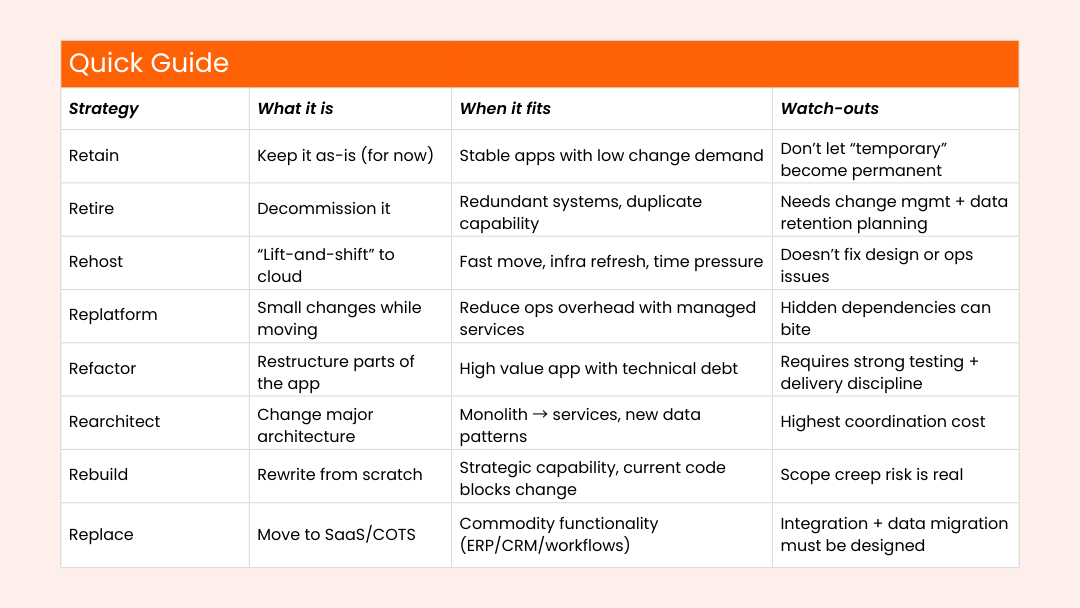
If you want a simple mental model:
- Rehost/Replatform = speed and risk control (often “phase 1”)
- Refactor/Rearchitect/Rebuild = long-term product health (“phase 2/3”)
- Retire/Replace = portfolio clean-up and simplification
Microsoft also documents the “6 Rs” model for modernization planning, which many teams use for portfolio decisions.
3) The decision framework: business value vs. complexity
If teams argue about “lift-and-shift vs rebuild” for weeks, it usually means they’re missing a shared decision frame.
Use a 2×2: Business Value vs Modernization Complexity.
Step 1: Score each app (fast, not perfect)
Ask four questions:
Business value
- Is this app strategic to revenue, customer experience, or operations?
- Is it differentiating, or could it be replaced without losing edge?
Complexity / risk
- How tangled are dependencies (auth, data, integrations, batch jobs)?
- How fragile is release/testing today?
- How much domain logic lives in the app vs surrounding systems?
Step 2: Map it to a path
High value + low complexity
- Good candidate for replatform or targeted refactor
- Aim: faster change and reduced operational burden
High value + high complexity
- Treat as a phased modernization program
- Often: strangler pattern (incrementally replace components), plus strong DevOps foundations
- Avoid “big bang” rewrites unless you have unusual certainty
Low value + low complexity
- Consider replace (SaaS) or retire
- Aim: remove maintenance load and reduce portfolio sprawl
Low value + high complexity
- Usually retain temporarily while you isolate dependencies
- Or retire once data and downstream usage are understood
What this prevents
It prevents teams from defaulting to architecture preferences (“we should microservice everything”) and forces a business-aligned decision: what do we keep, what do we change, what do we remove.
4) Planning your path with Microsoft Cloud Adoption Framework
Good modernization doesn’t start with a migration tool. It starts with portfolio clarity and delivery realism.
Microsoft’s Cloud Adoption Framework (CAF) is useful here because it breaks migration planning into decisions most teams overlook until late: strategy selection, readiness, landing zone foundations, governance, and operations.
A practical sequence that works well:
1) Inventory and dependency mapping
- Identify apps, databases, integrations, identity flows, and “quiet” dependencies (batch jobs, email, file drops)
- Classify workloads using the strategies above (per workload, not per program)
2) Define your target operating model (before the move)
- Who owns what in production?
- What is your incident response flow?
- What does “healthy” look like for each critical workflow?
3) Build a landing zone and guardrails
- Identity, network boundaries, logging/monitoring, key management
- Governance that matches risk (not paperwork theatre)
4) Execute in waves
- Low-risk wins first (prove the approach)
- Then business-critical workloads with lessons learned built-in
5) Tooling support: Azure Migrate + Azure Accelerate
Tooling won’t make decisions for you, but it can reduce manual effort and improve visibility.
Azure Migrate (and AI-assisted planning)

Azure Migrate supports discovery, assessment, and migration planning across workloads, and Microsoft has been adding AI-assisted capabilities to reduce friction in migration and modernization programs.
Use it to:
- build an inventory and map dependencies
- group workloads into “waves”
- document readiness and risks in a structured way
Azure Accelerate
Azure Accelerate is Microsoft’s umbrella program that brings together prior offerings (including Azure Migrate and Modernize / Azure Innovate) and pairs partners and customers with guidance and investment support for cloud and AI initiatives.
If your organization is unsure where to start, this kind of structure matters: it pushes the program away from “ad-hoc migrations” and toward repeatable execution.
6) Risk mitigation: how teams avoid disruption
Modernization fails most often in the “in-between” phase, when the old and new worlds must coexist.
Here’s what reduces risk in practice:
Staged cutovers and rollback clarity
- Decide up front: what triggers rollback, who approves it, and how it’s executed
- Don’t rely on “we’ll figure it out if something breaks”
Testing that matches reality
- Regression tests for critical business flows (not just unit tests)
- Integration tests for identity + data + external services
- Performance testing for peak patterns, not average load
Data migration as a program, not a task
- Define data ownership, quality checks, and reconciliation approach
- Plan for dual-write or sync if you’re moving in phases
Delivery discipline (the “hidden multiplier”)
Modernization becomes safer when your release model is predictable: small changes, clear approvals, traceability, and monitoring that connects incidents to changes.
If you want a practical blueprint for modern delivery on Microsoft programs, this Osmosys post is a useful companion:
- Agile, DevOps, and Beyond: Modern Delivery Approaches for Microsoft Projects
7) Region lens: ANZ, US, Canada considerations (high-level)
This is not legal advice, treat this as planning input and validate with your compliance and legal teams.
ANZ (Australia / New Zealand)
If you handle personal information, privacy expectations and governance requirements should be treated as design inputs. Australia’s Privacy Act is the baseline framework for many organizations’ handling of personal information.
For cloud initiatives, organizations often benefit from privacy impact assessment practices, especially for systems that touch customers, employees, or citizens.
Local proof point: Christchurch City Council has publicly discussed migrating a large share of its server estate to Microsoft’s cloud, framing it as a foundation for modern analytics and AI capabilities.
Canada
Canada’s federal private-sector privacy law PIPEDA applies to many organizations collecting, using, or disclosing personal information in commercial activities.
Modernization programs that involve customer data, call centers, or employee data should plan early for:
- access controls and auditability
- retention and deletion expectations
- incident response readiness
United States
The US context is often sector-driven (regulated industries set expectations on security controls, auditability, and third-party risk). Even when a formal standard isn’t mandated, cloud security reviews tend to expect:
- clear identity boundaries
- logging/monitoring readiness
- least-privilege access patterns
- vendor and integration governance
8) Success metrics that prove progress (without vanity numbers)
Avoid measuring modernization by “apps moved.” That’s activity, not outcome.
Use signals that executives and delivery teams both care about:
Delivery and change safety
- Are releases becoming smaller and more predictable?
- Are rollbacks rarer and easier?
- Are deployment approvals traceable and consistent?
Operational reliability
- Faster incident detection and clearer root cause
- Reduced repeat incidents tied to the same failure modes
- Monitoring coverage of critical user journeys (not just CPU graphs)
Platform and security posture
- Identity and access controls are consistent across workloads
- Audit logs and retention policies are defined and tested
- Third-party integrations have clear ownership and review cadence
Business experience
- Users trust the system changes (less “release fear”)
- Performance complaints reduce for critical workflows
- Cross-region experience is consistent (ANZ/US/CA rollouts)
9) Implementation checklist (use this before you commit)
- Confirm what “better” means (reliability, speed of change, cost predictability, security posture)
- Inventory workloads and dependencies (including batch jobs and integrations)
- Classify each app using migration strategies (retain/retire/rehost/replatform/refactor/rearchitect/rebuild/replace)
- Build a value vs complexity view to prioritize sequencing
- Define landing zone foundations: identity, network boundaries, logging, secrets/key management
- Decide operating model: ownership, on-call, incident response, change approvals
- Choose your wave plan (start with low-risk wins, then scale)
- Define cutover and rollback criteria per critical workload
- Build testing coverage for business-critical workflows (not just components)
- Plan data migration and reconciliation approach for phased moves
- Set “success signals” and review cadence (monthly is usually practical)
- Document region requirements (ANZ/US/CA) as design constraints, not afterthoughts
The “right” path is the one you can execute safely
There’s no universal best answer. The right approach depends on your constraints: budget, skills, risk tolerance, timelines, and how critical the system is.
What matters is making the decision explicitly, with a framework, and building the foundations that keep modernization from becoming disruption.
Request a Legacy App Assessment
If you’re deciding between rehosting, refactoring, rebuilding, or replacing, Osmosys can assess one legacy application and produce a practical modernization roadmap, including recommended path, sequencing, risk points, and the delivery steps required to execute it.
Request a Legacy App Assessment (and get a roadmap you can take to stakeholders).