


Microsoft Fabric is no longer just a data platform conversation. In 2026, it is becoming a governance conversation.
For many organisations, especially those working across finance, professional services, manufacturing, retail, healthcare, and public-sector-adjacent environments, the question has shifted from “Should we use Microsoft Fabric?” to “How do we govern Fabric before it becomes another uncontrolled data estate?”
That shift matters.
Microsoft Fabric brings data engineering, data factory, data science, data warehouse, real-time intelligence, Power BI, and OneLake into a single SaaS-based analytics platform. Microsoft describes Fabric as using OneLake as a centralized logical data lake for storing and accessing data across workloads, with the OneLake catalog supporting discovery, exploration, and governance across the tenant.
That sounds powerful, but it also raises a practical governance question for UK IT leaders and data owners:
When everyone can move faster with data, who is responsible for making sure the data remains trusted, protected, discoverable, and fit for use?
That is where Microsoft Fabric governance needs to move from theory to operating model.
Why Fabric governance matters more in 2026
The timing is important.
Microsoft’s recent Fabric updates show the platform continuing to expand. In May 2026, Microsoft listed updates including notebook export controls, capacity metrics app enhancements, a Chargeback app, and OneLake catalog availability in Microsoft Foundry. These are not just product updates; they point to a broader direction around governed data use, cost visibility, AI readiness, and administrative control.
At the same time, AI adoption is increasing pressure on data teams. Copilots, agents, and analytics tools are only as reliable as the data estate behind them. Poorly governed data can quickly become a business risk: duplicated definitions, unclear ownership, overexposed sensitive data, unmanaged exports, inconsistent reporting, and AI outputs based on weak foundations.
For UK organisations, this is especially relevant because governance expectations around data protection, accountability, auditability, and risk management are already part of everyday business. Fabric governance is not only about technical configuration. It is about giving business users more access to data without losing control of security, quality, lineage, and ownership.
What Microsoft Fabric governance really means
A good Fabric governance model should help answer five questions:
→ What data exists in the Fabric estate?
→ Who owns it?
→ Who can access it?
→ Can business users trust it?
→ Can administrators monitor and control it over time?
Microsoft’s governance and compliance guidance explains that Fabric capabilities help organisations manage, protect, monitor, and improve the discoverability of sensitive information. It also highlights key governance components such as the admin portal, domains, capacities, metadata scanning, sensitivity labels, auditing, tags, lineage, and monitoring.
In practical terms, Fabric governance should not be treated as one feature. It is a combination of:
→ tenant-level administration
→ workspace and capacity structure
→ domain ownership
→ OneLake catalog governance
→ Purview integration
→ data security and access control
→ sensitivity labels
→ audit and monitoring
→ cost and capacity visibility
→ operating discipline after go-live
The mistake is to start with tools before defining ownership.
The better approach is to decide what needs to be governed first, then configure Fabric accordingly.
OneLake governance: start with the data foundation
OneLake is central to Fabric governance because it is designed as a single, unified, logical data lake for the whole organisation. Microsoft describes OneLake as included with every Fabric tenant and intended as the single place for analytics data. It supports one data lake for the organisation, one copy of data for multiple analytical engines, and built-in protection capabilities such as soft delete and disaster recovery options.
That makes OneLake a strong foundation, but it also means governance needs to start early.
Without a clear model, OneLake can become a convenient place for every team to publish, copy, shortcut, transform, and report on data in different ways. The problem is not that teams use the platform. The problem is that usage grows faster than ownership.
This is why onelake governance should begin with a few practical decisions:
→ Which data belongs in certified, business-critical zones?
→ Which workspaces are experimental, departmental, or production-ready?
→ Which data products should be visible to wider business users?
→ Which data sets need sensitivity labels?
→ Which shortcuts connect to external or cross-domain data sources?
→ Which semantic models and reports are trusted for decision-making?
Microsoft’s OneLake shortcuts guidance is also relevant here. Shortcuts let organisations connect to existing data without directly copying it, helping OneLake act as a single virtual data lake across domains, clouds, and accounts. Microsoft notes that Fabric experiences and analytical engines can connect to existing sources including Azure, AWS, and OneLake through a unified namespace.
That flexibility is useful, but it needs governance. A shortcut is still a data dependency. It should have an owner, purpose, access model, and review cycle.
Domains: organise Fabric around the business
Domains are one of the most important governance concepts in Microsoft Fabric because they help move data management closer to business ownership.
Microsoft defines a Fabric domain as a way of logically grouping data in an organisation that is relevant to a particular area or field. One common use is grouping data by business department so teams can manage data according to their own regulations, restrictions, and needs. Workspaces are associated with domains, and items within those workspaces receive the domain attribute as metadata.
For UK organisations, this is where Fabric governance becomes more practical.
Instead of one central IT team trying to own every data asset, domains allow the operating model to reflect how the business actually works. Finance, Sales, Operations, HR, Customer Service, and Supply Chain may all have different data responsibilities, quality expectations, reporting needs, and risk profiles.
A strong domain model should define:
→ domain owner
→ domain admin
→ data stewards or contributors
→ workspace naming rules
→ certification and endorsement expectations
→ sensitivity and access expectations
→ data product review process
→ escalation path for governance issues
This is where fabric data governance becomes less abstract. Domains should not just exist as labels. They should become accountability boundaries.
A weak domain model says: “Finance data is in this workspace.”
A strong domain model says: “Finance owns this data product, these are the approved reports, these are the access rules, this is the review cycle, and this is the escalation route.”
OneLake catalog: improve discovery, trust, and action
Data governance often fails when users cannot find the right data or cannot tell whether the data they found is trustworthy.
This is where the OneLake catalog is becoming important.
Microsoft’s documentation says the Govern tab in the OneLake catalog enables users to assess, enhance, and oversee the governance status of data throughout Fabric. It brings together insights, recommended actions, and links to tools and learning resources. Fabric admins can see governance insights based on tenant metadata across items, workspaces, capacities, and domains.
This is highly relevant for business adoption.
In many organisations, users do not struggle because there is no data. They struggle because there are too many reports, too many versions of similar metrics, and too little confidence in which asset is the right one.
The OneLake catalog should therefore be operationalised for:
→ discoverability
→ ownership visibility
→ endorsement and certification
→ domain filtering
→ governance insights
→ recommended governance actions
→ better reuse of trusted assets
For a UK business user, the goal should be simple: they should be able to find the right data asset, understand whether it is trusted, know who owns it, and avoid building duplicate reports from uncertain sources.
Purview and Fabric: govern beyond the workspace
Fabric governance becomes stronger when it connects to Microsoft Purview.
Microsoft states that Purview and Fabric together help organisations govern the estate and lineage of data, from source through to Power BI reports. The integration includes Microsoft Purview Unified Catalog, Information Protection, Data Loss Prevention, Audit, Insider Risk Management, and governance for Fabric Copilots and agents.
This matters because Fabric governance is not only about what happens inside a workspace.
Sensitive data may move through pipelines, lakehouses, warehouses, semantic models, reports, exports, shortcuts, and AI experiences. A governance model that only reviews reports will miss the wider risk picture.
Purview helps connect governance to:
→ sensitivity labels
→ data classification
→ lineage
→ audit activity
→ DLP policies
→ insider risk signals
→ AI interaction governance
→ regulatory and compliance workflows
For UK organisations, this is where Fabric governance can support more serious accountability. It gives data, security, compliance, and IT teams a more joined-up way to understand how data is stored, used, protected, and shared.
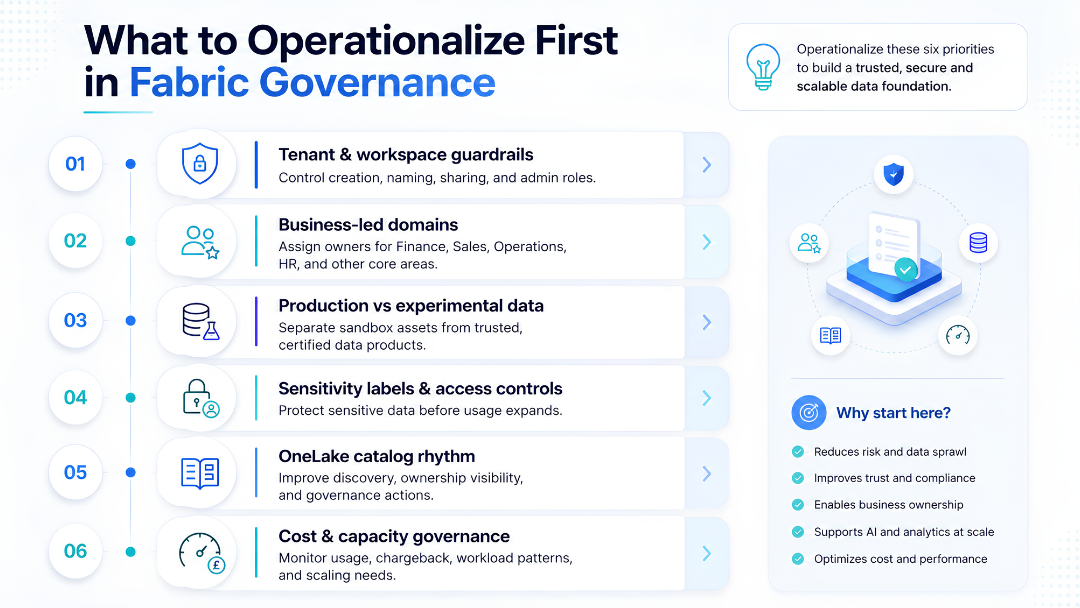
What to operationalise first
The biggest mistake is trying to govern everything at once.
A practical Microsoft Fabric governance roadmap should begin with the areas that reduce the most risk and create the most clarity.
1. Define your tenant and workspace guardrails
Start with the admin layer.
The Fabric admin portal is the central place for administrators to control the Fabric estate, including tenant settings, users, capacities, domains, and workspace-level behaviour.
Operationalise:
→ who can create workspaces
→ naming conventions
→ environment types
→ external sharing rules
→ export controls
→ tenant-level feature settings
→ admin roles and responsibilities
→ audit review ownership
This prevents the platform from scaling in an unmanaged way.
2. Create a business-led domain model
Do not let domains become decorative metadata.
Start with a small number of meaningful business domains and assign accountable owners. Avoid over-designing the structure in the first phase. The aim is to create clarity, not complexity.
Operationalise:
→ domain owner
→ domain admin
→ workspace-to-domain mapping
→ certification process
→ domain-level data review
→ domain-specific access principles
3. Separate experimental, departmental, and production data
Not every Fabric asset deserves the same level of trust.
A draft notebook, a departmental lakehouse, and a certified executive dashboard should not be treated equally. Create a clear maturity model for data assets.
Operationalise:
→ sandbox workspaces
→ departmental workspaces
→ production workspaces
→ certified semantic models
→ approved reporting layer
→ lifecycle rules for unused assets
4. Apply sensitivity labels and access controls early
Access should not be fixed after a problem.
Microsoft notes that Fabric governance includes permissions, sensitivity labels, and auditing, with controls applied and inherited across Fabric items.
Operationalise:
→ sensitivity labels
→ role-based access
→ access review cycles
→ export restrictions
→ guest and external user controls
→ least-privilege access principles
OneLake security is also important here. Microsoft’s May 2026 documentation says OneLake security enables role-based access control for data stored in OneLake, including access to specific folders and row or column-level security, with permissions determining what users can see across Fabric experiences.
5. Use the OneLake catalog for governance rhythm
Governance should not be a one-time setup.
Use the OneLake catalog’s Govern tab to review insights, recommended actions, and domain-level governance posture. This creates a repeatable governance rhythm instead of a one-off clean-up exercise.
Operationalise:
→ monthly governance review
→ ownership gaps
→ uncertified high-use assets
→ missing descriptions
→ unclear domains
→ risky access patterns
→ unused or duplicate assets
6. Connect governance to cost and capacity
Fabric governance is also cost governance.
Microsoft’s May 2026 updates include capacity metrics app enhancements and a Chargeback app generally available, helping surface utilization, throttling, compute usage, SKU, and workload-type allocation.
Operationalise:
→ capacity ownership
→ cost allocation
→ workload monitoring
→ chargeback or showback reporting
→ high-consumption item reviews
→ environment-level capacity planning
This helps business leaders understand that governance is not only about compliance. It is also about operational efficiency.
A 30-day Fabric governance starting plan
Week 1: Map the estate
Identify current Fabric workspaces, Power BI assets, lakehouses, warehouses, pipelines, shortcuts, semantic models, and owners.
Focus on visibility first.
Week 2: Define domains and ownership
Create an initial domain model around major business areas. Assign owners and admins. Do not wait for a perfect enterprise model.
Start with the areas where data has the highest business value or compliance sensitivity.
Week 3: Set guardrails
Review tenant settings, workspace creation rules, external sharing, export controls, sensitivity labels, and access principles.
Prioritise the settings that reduce immediate risk.
Week 4: Build the governance rhythm
Create a monthly review covering domain health, access risks, duplicate assets, uncertified reports, cost signals, and ownership gaps.
Governance only works when it becomes routine.
Final thought
Microsoft Fabric can simplify the analytics estate, but only when governance is designed into the way the platform is adopted.
OneLake gives organisations a unified data foundation. Domains help align ownership with the business. The OneLake catalog improves discovery and governance visibility. Purview extends protection, lineage, audit, and compliance controls across the wider estate.
Together, these capabilities can make Fabric a stronger platform for data, reporting, and AI-readiness.
But the technology alone is not the governance model.
The real work is deciding who owns the data, how trusted assets are identified, how access is controlled, how risk is reviewed, and how the platform is managed after adoption expands.
For UK organisations planning Fabric in 2026, the right starting point is not “enable everything.”
It is:
→ govern the tenant
→ organise by domain
→ protect sensitive data
→ certify what the business can trust
→ monitor usage, cost, and risk
→ repeat the process every month
That is how Microsoft Fabric governance becomes operational, not theoretical.
At Osmosys, we help organisations design practical Microsoft Fabric, Power BI, and Azure data governance models that are easier to adopt, manage, and scale.
FAQs
What is Microsoft Fabric governance?
Microsoft Fabric governance is the process of managing, protecting, monitoring, and organising data assets across Fabric. It includes tenant settings, domains, workspaces, OneLake, sensitivity labels, access control, auditing, cataloging, lineage, and Purview integration.
Why is OneLake important for Fabric governance?
OneLake is the unified logical data lake in Microsoft Fabric. Since many Fabric workloads use OneLake as the data foundation, governance needs to define ownership, access, sensitivity, cataloging, and reuse rules around OneLake assets.
What are domains in Microsoft Fabric?
Domains in Microsoft Fabric are logical groupings of data by business area, department, function, or subject. They help organisations organise workspaces and data assets around business ownership and governance responsibility.
How does Microsoft Purview support Fabric governance?
Microsoft Purview supports Fabric governance through cataloging, sensitivity labels, data protection, audit logs, DLP policies, lineage, insider risk management, and governance controls for Fabric Copilots and agents.
What should organisations operationalise first in Microsoft Fabric governance?
Organisations should first operationalise tenant settings, workspace structure, domain ownership, sensitivity labels, access controls, OneLake catalog usage, certified data assets, and monthly governance reviews.