

For many organisations, Dynamics 365 is no longer just a CRM or ERP system. It is the operational layer behind sales, service, finance, field operations, customer engagement, reporting, automation, and increasingly, AI-enabled business workflows.
That makes support more important than ever.
In 2026, the question for UK organisations is not simply, “Who can fix Dynamics 365 issues when something breaks?”
The better question is:
Who can help us keep Dynamics 365, Power Platform, integrations, releases, users, and governance working together every week?
That is where Dynamics 365 managed services become more than traditional application support.
Microsoft’s 2026 release wave 1 for Dynamics 365 is already underway, with new features releasing from April through September 2026 across Sales, Customer Service, Contact Center, Field Service, Finance, Supply Chain Management, Business Central, Customer Insights, and other applications. Microsoft also notes that these release plans are updated weekly as features are prepared for release.
At the same time, Power Platform is also receiving hundreds of new features in the 2026 release wave 1, covering Power Apps, Power Automate, Power Pages, Copilot Studio, Dataverse, and governance and administration capabilities.
For businesses running Microsoft business applications, this creates a practical challenge: the platform keeps moving, but daily operations cannot afford uncertainty.
That is why good managed services should not feel like a reactive helpdesk. They should feel like an extension of your technology, operations, and business change teams.
Why Dynamics 365 managed services matter more in 2026
Dynamics 365 estates have become more connected.
A single customer journey may involve Dynamics 365 Sales, Customer Service, Power Automate, Dataverse, Power BI, Outlook, Teams, external portals, finance systems, third-party integrations, and custom applications.
When something goes wrong, the issue may not sit neatly inside one product.
A failed approval flow may affect order processing. A data sync issue may affect reporting. A permissions change may block a service team. A release update may alter user behaviour. A poorly governed app may expose business data in the wrong environment.
This is why application support services need to go beyond ticket closure.
Good support needs to understand:
→ the business process
→ the application configuration
→ the data model
→ the integration layer
→ the security model
→ the release calendar
→ the user impact
→ the governance risk
The UK context makes this even more relevant. The UK Government’s Cyber Security Breaches Survey 2025/2026 reported that 43% of businesses experienced a cyber security breach or attack in the previous 12 months, with medium and large businesses reporting higher rates at 65% and 69% respectively. The same report also found that only 15% of businesses formally reviewed risks posed by immediate suppliers, and only 6% reviewed wider supply chain risks.
That does not mean every Dynamics 365 support issue is a cyber incident. But it does show why supplier governance, operational visibility, access control, and response readiness matter for business-critical platforms.
Managed services are no longer only about uptime. They are about trust, continuity, and accountability.
What good global support actually means
Global support does not only mean “someone is awake in another time zone.”
For UK, US, and ANZ-facing organisations, good global support means support coverage is designed around how the business operates.
A UK-based business may have sales teams in North America, operations in Australia, finance users in the UK, and delivery teams across India or Europe. A Dynamics 365 or Power Platform issue raised at the end of the UK day may become a blocker for another region a few hours later.
That is where follow-the-sun support can help, but only if it is structured properly.
A weak global support model looks like this:
→ tickets passed between teams without context
→ repeated questions from different support engineers
→ no clear severity model
→ no business impact assessment
→ no ownership across time zones
→ no proactive monitoring
→ fixes applied without release discipline
→ users losing confidence in the platform
A strong global support model looks very different.
It has clear handovers, documented runbooks, named ownership, impact-based prioritisation, environment awareness, and a consistent operating rhythm. It does not treat every ticket as isolated. It connects issues back to process, release, governance, and long-term improvement.
1. Support should begin with business impact, not ticket labels
The first sign of mature Dynamics 365 managed services is how issues are triaged.
A basic support model asks:
“What is the issue?”
A better support model asks:
“What business process is affected, who is affected, and what happens if this is not resolved today?”
That distinction matters.
A minor-looking workflow error may delay order approvals. A report refresh issue may affect leadership decisions. A user access problem may stop a customer service team from resolving cases. A Power Automate failure may silently block downstream activity.
Good support teams classify tickets by business impact, not only technical category.
A practical severity model should consider:
→ number of users affected
→ business process affected
→ customer impact
→ revenue or operational impact
→ data sensitivity
→ region or time-zone impact
→ workaround availability
→ compliance or audit implications
This gives decision-makers a more realistic view of urgency.
It also prevents the common support problem where high-volume, low-impact tickets consume attention while fewer but more critical issues wait too long.
2. Release management should be part of managed services
Dynamics 365 and Power Platform are cloud platforms. Change is constant.
Microsoft’s release schedule explains that Dynamics 365, Power Platform, and role-based Copilot offerings receive service updates in two annual release waves. For 2026 release wave 1, production deployment began on 1 April 2026, with wave 1 covering April through September. Microsoft also highlights early access as a way to validate updates in sandbox environments before they are applied to production.
This is exactly why managed services should include release readiness.
Good support should help answer:
→ Which upcoming features could affect our users?
→ Which features are enabled automatically?
→ Which require admin or maker action?
→ Which environments should be tested first?
→ Which business teams need communication?
→ Which customisations or integrations need regression testing?
→ Which release changes should be parked for later?
Without this discipline, organisations end up treating Microsoft updates as surprises.
A stronger managed services partner should maintain a release calendar, test plan, stakeholder communication process, and post-release review.
The goal is not to block platform change. The goal is to absorb change without breaking business confidence.
3. Power Platform managed services need governance, not only maker support
Dynamics 365 and Power Platform are deeply connected.
Many organisations use Power Automate for approvals, Power Apps for role-specific applications, Power Pages for external portals, Dataverse for business data, and Copilot Studio for intelligent experiences.
That means power platform managed services should be included in the wider support model.
Microsoft describes the Power Platform admin center as a unified portal where administrators manage environments and settings for Power Apps, Power Automate, Power Pages, Copilot Studio, and some Dynamics 365 apps. It includes areas for managing environments, security, monitoring, deployment, licensing, and support.
Good managed services should therefore cover:
→ environment strategy
→ maker governance
→ flow monitoring
→ app lifecycle management
→ solution deployment
→ connector usage
→ Dataverse capacity
→ license visibility
→ security and access reviews
→ Copilot governance
→ orphaned apps and flows
→ ownership transfer when users leave
Managed Environments are also important here. Microsoft describes Managed Environments as premium capabilities that help admins manage Power Platform at scale with more control, less effort, and more insights. Features include environment groups, sharing limits, weekly usage insights, data policies, pipelines, solution checker, IP firewall, customer-managed key, Lockbox, extended backup, and other governance capabilities.
The practical point is simple: Power Platform support cannot only be “fix this flow.” It needs governance around who builds, who owns, who approves, who monitors, and who retires.
4. Monitoring should happen before users complain
A weak support model waits for users to raise issues.
A stronger model monitors the estate before disruption becomes visible.
For Dynamics 365 and Power Platform, this can include:
→ service health
→ failed flows
→ integration failures
→ data sync issues
→ plugin or workflow errors
→ API limits
→ environment capacity
→ licence consumption
→ security changes
→ deployment failures
→ unusual usage patterns
→ recurring ticket themes
Microsoft notes that Dynamics 365 and Power Platform service health information can be viewed in the Power Platform admin center through the Service health tab, with filters for product category, issue type, and status.
That visibility should feed into managed services routines.
Good support teams should not only say, “Microsoft had an incident.” They should say:
→ which users or regions may be affected
→ which business processes are at risk
→ whether a workaround is available
→ when the next update will be shared
→ what should be checked after resolution
This is where communication becomes as important as technical analysis.
For global organisations, support is not only about fixing the platform. It is about reducing uncertainty while the issue is being fixed.
5. Good support includes user adoption and training signals
Many Dynamics 365 problems are not purely technical.
Sometimes the system works, but users do not trust it. Sometimes the process is configured correctly, but the form is too confusing. Sometimes users bypass the system because they do not understand why a field matters. Sometimes adoption drops after a release because no one explained what changed.
Good Dynamics 365 managed services should track these signals.
Useful support insights include:
→ repeated “how do I” questions
→ fields users consistently enter incorrectly
→ reports users do not trust
→ approvals that regularly get stuck
→ teams that avoid using the system
→ high-volume manual corrections
→ recurring training gaps
→ process steps users misunderstand
This turns support from a cost centre into an improvement engine.
Instead of only closing tickets, the managed services team can recommend small changes that reduce future tickets:
→ simplify a form
→ update help text
→ improve validation
→ adjust a workflow
→ create a short user guide
→ refresh role-based training
→ clean up duplicate views
→ retire unused fields
→ improve dashboard clarity
These are not dramatic changes, but they often create the biggest difference in daily user experience.
6. A good managed services model has clear ownership
One of the biggest reasons managed services fail is unclear ownership.
The client assumes the partner owns the issue. The partner assumes it sits with Microsoft. Microsoft asks for environment evidence. The internal IT team waits for business confirmation. The business team waits for IT to explain the impact.
This wastes time.
A good support model defines ownership before the issue happens.
For each major area, define:
→ application owner
→ technical owner
→ business process owner
→ integration owner
→ data owner
→ security approver
→ release approver
→ escalation contact
→ partner support owner
→ Microsoft support route
This is especially important for global teams because handovers happen across regions.
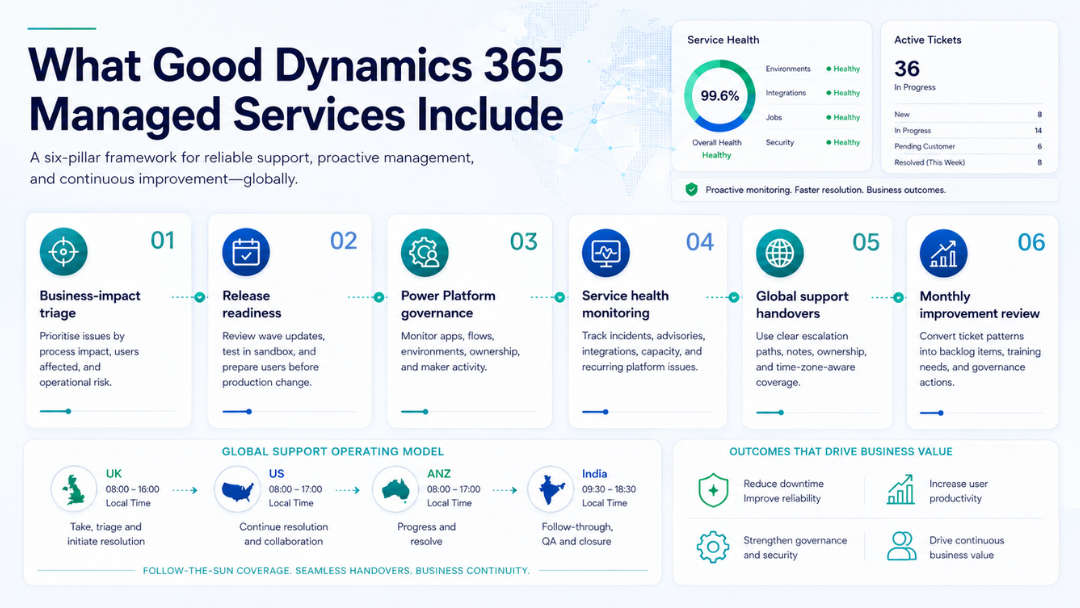
A strong follow-the-sun support model should include:
→ clear severity definitions
→ handover notes between shifts
→ ticket ownership rules
→ escalation paths
→ time-zone-aware response expectations
→ major incident communication templates
→ agreed business hours by region
→ named contacts for critical processes
Without this structure, follow-the-sun support can become follow-the-ticket confusion.
7. Managed services should produce monthly business insight
A good managed services partner should not only send ticket counts.
Ticket counts are useful, but they do not tell the full story.
A monthly managed services review should explain:
→ what issues occurred
→ which areas created repeated tickets
→ which fixes reduced future risk
→ which releases are coming next
→ which integrations need attention
→ which environments need cleanup
→ which users or teams need training
→ which risks need leadership attention
→ which improvements should be prioritised
For UK leadership teams, this kind of reporting matters because it connects application support to operational governance.
The NCSC’s cloud security principles are also useful here because they apply to both cloud platforms and SaaS. The guidance highlights areas such as governance framework, operational security, secure user management, identity and authentication, secure service administration, audit information, and secure use of the service.
Those principles reinforce a key point: cloud and SaaS services still need secure configuration, monitoring, accountability, and operational discipline.
Managed services should make that discipline visible.
What to include in a Dynamics 365 managed services scope
A practical managed services scope should include more than generic support hours.
For Dynamics 365 and Power Platform, consider including:
→ incident and request management
→ service health monitoring
→ release wave review
→ sandbox validation
→ regression testing support
→ user access management
→ security role review
→ environment and capacity monitoring
→ Power Automate flow monitoring
→ Power Apps and Dataverse support
→ integration monitoring
→ data quality checks
→ report and dashboard support
→ ALM and deployment support
→ documentation updates
→ monthly governance review
→ adoption and training recommendations
→ continuous improvement backlog
This does not mean every organisation needs the same support model.
A mid-sized UK business may need business-hours support with planned release governance. A global organisation may need extended coverage, regional handovers, and major incident processes. A fast-scaling Microsoft ecosystem may need a stronger focus on Power Platform governance and ALM.
The right model depends on business criticality, user footprint, regional coverage, internal IT capacity, and platform maturity.
A practical 30-day review plan
If your organisation is reviewing Dynamics 365 or Power Platform support this quarter, start with a 30-day assessment.
Week 1: Map the estate
List Dynamics 365 apps, Power Platform environments, integrations, reports, customisations, critical workflows, and owners.
Week 2: Review support patterns
Look at the last three to six months of tickets. Identify recurring themes, high-impact issues, delayed resolutions, and unclear ownership areas.
Week 3: Check release and governance readiness
Review release wave processes, sandbox testing, environment strategy, security roles, flow ownership, and admin responsibilities.
Week 4: Define the managed services rhythm
Set the support model, escalation path, monthly review format, release calendar, improvement backlog, and regional handover process.
This exercise quickly shows whether the current model is genuinely managed services or just reactive application support.
Final thought
Good Dynamics 365 managed services are not defined by how quickly someone replies to a ticket.
They are defined by how well the support model protects business continuity, user confidence, platform governance, and future change.
In 2026, Dynamics 365 and Power Platform environments are changing too quickly for support to remain reactive. Release waves, AI-enabled features, integrations, data dependencies, and regional operations all need a more structured model.
For UK organisations supporting users across the UK, US, ANZ, and offshore delivery teams, good global support should provide:
→ clear ownership
→ release readiness
→ Power Platform governance
→ service health visibility
→ proactive monitoring
→ user adoption insight
→ time-zone-aware handovers
→ monthly business-level reporting
That is what good global support actually looks like.
Not just tickets closed.
A platform that stays easier to run, easier to trust, and easier to improve.
At Osmosys, we help organisations support, govern, and improve their Dynamics 365, Power Platform, and Microsoft business application estates with practical managed services built around real business operations.
FAQs
What are Dynamics 365 managed services?
Dynamics 365 managed services are ongoing support and improvement services for Dynamics 365 applications. They can include incident support, release management, user access, Power Platform governance, integrations, monitoring, reporting, and continuous improvement.
Why do businesses need Dynamics 365 managed services?
Businesses need Dynamics 365 managed services because Dynamics 365 environments are constantly changing through release waves, integrations, automation, user requirements, and security needs. Managed services help keep the platform stable, governed, and aligned with business operations.
What should good Dynamics 365 managed services include?
Good Dynamics 365 managed services should include incident management, release readiness, service health monitoring, Power Platform support, security review, integration monitoring, user adoption support, reporting, and monthly governance reviews.
What is follow-the-sun support?
Follow-the-sun support is a global support model where teams across different time zones hand over work so issues can progress beyond one region’s business hours. For Dynamics 365, it works best when severity rules, handover notes, escalation paths, and ownership are clearly defined.
How are Power Platform managed services connected to Dynamics 365 support?
Power Platform managed services are connected because many Dynamics 365 environments rely on Power Apps, Power Automate, Dataverse, Power Pages, and Copilot Studio. A strong managed services model should support both Dynamics 365 and Power Platform governance together.