


The best tech rollout means nothing if no one uses it.
You’ve probably seen both versions of the same story:
- A CRM goes live. Users keep working in spreadsheets. Leadership calls it “resistance.” The product team calls it “training gaps.” Nobody calls it “our delivery plan.”
- Another rollout goes live. People actually switch. Managers reinforce it. Support requests drop. The new way of working becomes normal.
The difference usually isn’t the platform. It’s change management, the work of helping people understand, adopt, and sustain the change.
Prosci’s research is blunt: 88% of initiatives with excellent change management meet or exceed objectives, compared to 13% with poor change management.
This post is a practical guide to making modernization stick, across Dynamics 365, Power Platform, Fabric/data, and cloud programs, without treating adoption as an afterthought.
1) Modernization is more than technology
A common misconception: once the solution is “built correctly,” adoption should happen automatically.
In reality, even well-designed transformations struggle. McKinsey’s transformation practice has repeatedly highlighted that a large share of transformations fail, with common causes including insufficient engagement and capability-building.
In enterprise programs, the “hard” work isn’t only data migration, integrations, or security. It’s also:
- Role changes: new handoffs, new responsibilities, new approvals
- Identity changes: “this is how I’ve always done it”
- Incentive conflicts: teams measured on speed, not quality; output, not adoption
- Unspoken fears: loss of control, visibility, or autonomy
A people-centric plan treats those as delivery requirements, not as “soft” concerns to handle later.
2) What “people-centric” actually looks like
People-centric modernization doesn’t mean making everything optional.
It means you design the rollout around human behavior:
- Clarity: what changes, for whom, and why
- Confidence: “I know how to do my job in the new system”
- Commitment: leaders reinforce the change consistently
- Control: users can give feedback and see it acted on
If you’re implementing Dynamics 365, Power Platform, or a new data platform, user trust and habits matter as much as configuration.
3) A practical change management framework (that teams will follow)
Here’s the model we recommend for modernization programs (simple enough to run, structured enough to scale):
Step 1: Define the “why” in business language
Avoid generic messaging like “digital transformation.”
Use a sentence that connects to daily work:
- “We’re reducing duplicate data entry between Sales and Finance.”
- “We’re cutting time to answer customer queries by keeping context in one place.”
- “We’re moving reporting from manual reconciliation to governed, reusable datasets.”
Step 2: Map the impact by role (not by department)
Create a one-page role impact map:
- What they do today
- What changes in the new world
- What stays the same
- What support they’ll get
- What success looks like
Step 3: Choose adoption moments (not just training dates)
Most adoption plans fail because they confuse training completion with behavior change.
Define the real moments that matter:
- First time a sales rep logs an opportunity end-to-end
- First time a supervisor approves a workflow inside Teams
- First time a nurse manager pulls a dashboard without asking an analyst
Step 4: Enable managers, not just end users
Managers are the enforcement layer.
Equip them with:
- Talk track (what to reinforce and why)
- “What good looks like” checklist
- A small dashboard of adoption indicators (more on this later)
Step 5: Build feedback loops into the rollout
Adoption improves when people feel heard.
Set up:
- Office hours
- A single intake channel for friction points
- A cadence for changes (weekly/bi-weekly)
- A “what we fixed” changelog
Step 6: Reinforce and sustain
Your go-live isn’t the end. It’s the start of habit formation.
Plan for:
- 30/60/90-day reinforcement nudges
- Refresher sessions
- Peer-sharing sessions (“how I use this in real life”)
- Recognition for teams who adopt well
Prosci’s research consistently shows better outcomes when the people side is managed intentionally, including being approximately seven times more likely to meet objectives versus poor change management.

4) The champion model: your adoption multiplier
Champions are not “power users.” They’re translators.
They help turn a system into a working habit by:
- demonstrating real scenarios
- collecting friction points
- encouraging peers who hesitate
- preventing workaround culture
What a strong champion network looks like
- One champion per function or site (for multi-location orgs)
- Weekly 20-minute sync during rollout
- A clear escalation path to the product/team
- Recognition from leadership (small, consistent)
Healthcare example (industry illustration, 30%)
Imagine a Canadian healthcare provider implementing a new data platform for clinical ops reporting.
They appointed “data champions” in each department:
- Patient operations
- Nursing leadership
- Finance
- Compliance
Instead of one massive training, they:
- ran scenario-based workshops (“how to answer these 5 questions faster”)
- piloted with two departments first
- published a simple “report glossary” (shared definitions)
- opened weekly office hours for the first 8 weeks
Result: adoption didn’t rely on one analytics team. It became distributed, so new habits actually formed.
5) How a Center of Excellence supports adoption (without creating bureaucracy)
A Center of Excellence (CoE) can help adoption, especially for Power Platform, Copilot Studio, and citizen development, when it focuses on enablement plus guardrails.
Microsoft’s Power Platform CoE Starter Kit is specifically designed to help organizations build governance, monitoring, and adoption capabilities using Power Platform’s native tools.
What the CoE should do (adoption-first)
- publish “how we build here” standards (naming, environments, approvals)
- offer templates (apps, flows, dashboards)
- run office hours and clinics
- monitor adoption and risk indicators
- keep leadership informed with clear reporting
What the CoE should avoid
- turning into a gatekeeper for every small request
- creating policy documents nobody reads
- measuring success only by number of apps built
If your CoE is helping people ship useful solutions safely, it’s working. If it’s slowing everyone down, it needs redesign.
6) Adoption metrics that actually tell you the truth
If you can’t measure adoption, you can’t manage it.
Here are metrics that typically correlate with real usage (choose 6–8 that fit your environment):
Behavior metrics
- Active users (weekly), by role
- Core workflow completion rate (e.g., lead → opportunity → quote)
- Feature usage (top 5 critical features)
- Workarounds count (how often people export to Excel or use shadow tools)
Confidence metrics
- Training-to-usage gap (trained users vs active users)
- “Time-to-first-value” (how quickly new users complete a real task)
- Helpdesk themes (volume + type; are they “how do I” or “it’s broken”?)
Sentiment metrics
- User satisfaction pulse (3-question survey)
- Manager confidence score (“my team can operate in the new process”)
Keep metrics role-specific. A finance user’s adoption signal isn’t the same as a sales user’s.
7) Course-correction tactics when adoption stalls
When adoption dips, don’t assume people are lazy.
Assume the rollout has friction.
Try these fixes in order:
- Remove the top 3 points of friction
Identify the most common blockers and fix them quickly (navigation, missing fields, slow load, unclear permissions). - Switch training from “features” to “scenarios”
People adopt tasks, not menus. - Use manager reinforcement
Ask managers to review one workflow artifact weekly (e.g., opportunity notes, case closure quality). - Publish “how we do this now” one-pagers
Short, role-based guides beat long documentation. - Run a 2-week adoption sprint
Treat adoption like product work: backlog, prioritization, weekly release of fixes, and clear reporting.
8) Region lens: ANZ, US, and Canada
The human question is the same everywhere:
“What’s in it for me?”
But the context changes:
- ANZ: distributed operations and site-based work often need local champions and clear manager reinforcement.
- Canada: bilingual teams or regionally distributed orgs benefit from consistent definitions, repeatable training, and role-based documentation.
- US: scale and change fatigue are common; adoption plans must be practical, time-bound, and measurable.
If your program spans regions, “one message” isn’t enough. Keep the core narrative consistent, but localize examples, champions, and enablement.
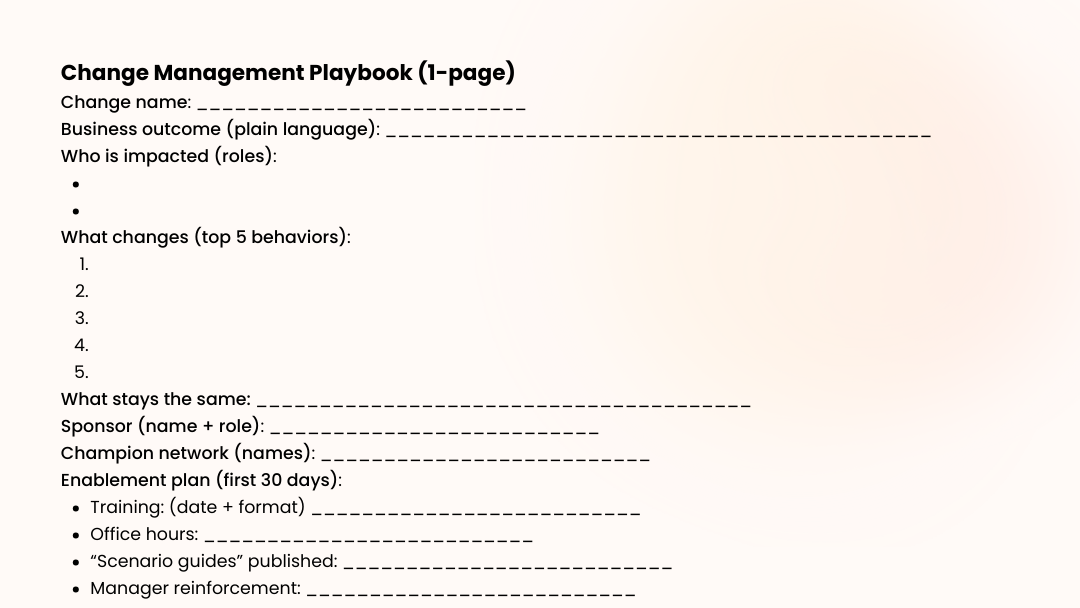
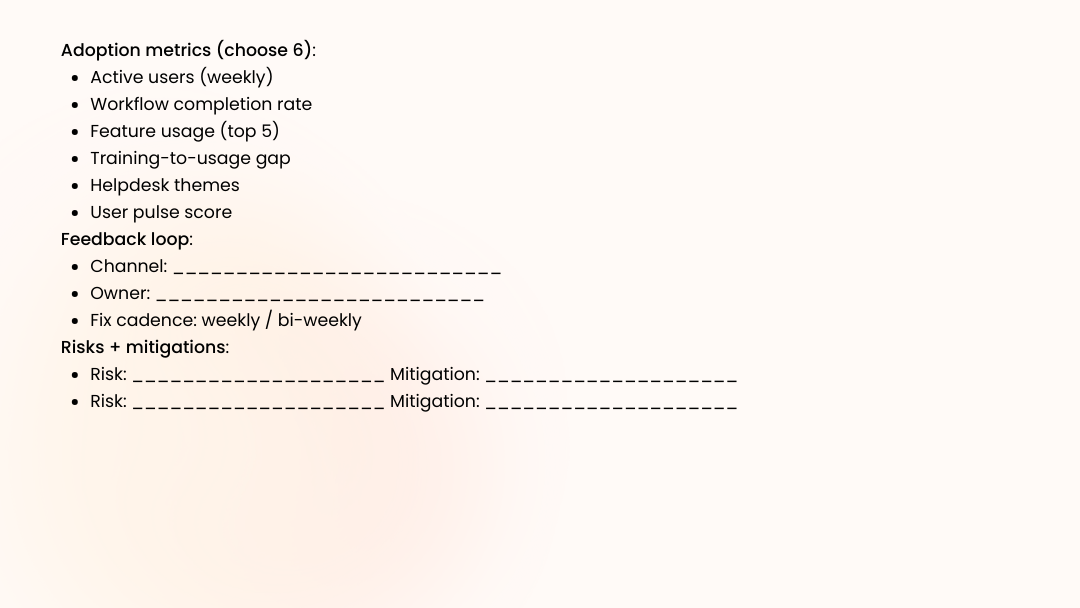
9) Downloadable asset: Change Management Playbook (one-page template)
Use this as a copy/paste one-pager (turn into a PDF for your rollout pack).
Conclusion
If you want modernization to pay off, treat change management as part of delivery, not as a rollout email and a training calendar.
The organizations that win don’t just “implement Microsoft.” They help people adopt it, role by role, habit by habit, using champions, clear reinforcement, and measurable feedback loops.
Want help mapping adoption for your next rollout?
Osmosys offers a Free Change Management Workshop where we’ll help you build a role-based adoption plan (champions, enablement, metrics, and a 30/60/90-day reinforcement rhythm).
FAQs
What is change management in a modernization project?
Change management is the structured approach to helping people adopt new ways of working, through communication, training, reinforcement, and feedback loops, so the new system is actually used.
Why do good systems fail to get adopted?
Common reasons include unclear “why,” insufficient role-based enablement, lack of manager reinforcement, and friction in the workflow that pushes people back to old tools.
What metrics should I track for user adoption?
Start with weekly active users, core workflow completion, feature usage for critical tasks, training-to-usage gap, helpdesk themes, and a simple user sentiment pulse.
Do I need a Center of Excellence for Power Platform adoption?
Not always, but a CoE can help when citizen development grows. Microsoft’s CoE Starter Kit is built to support governance, monitoring, and adoption at scale.
What’s a realistic timeline to see adoption improve?
Most teams see meaningful movement in 4–8 weeks when they combine scenario-based training, manager reinforcement, and weekly fixes to remove friction.
