
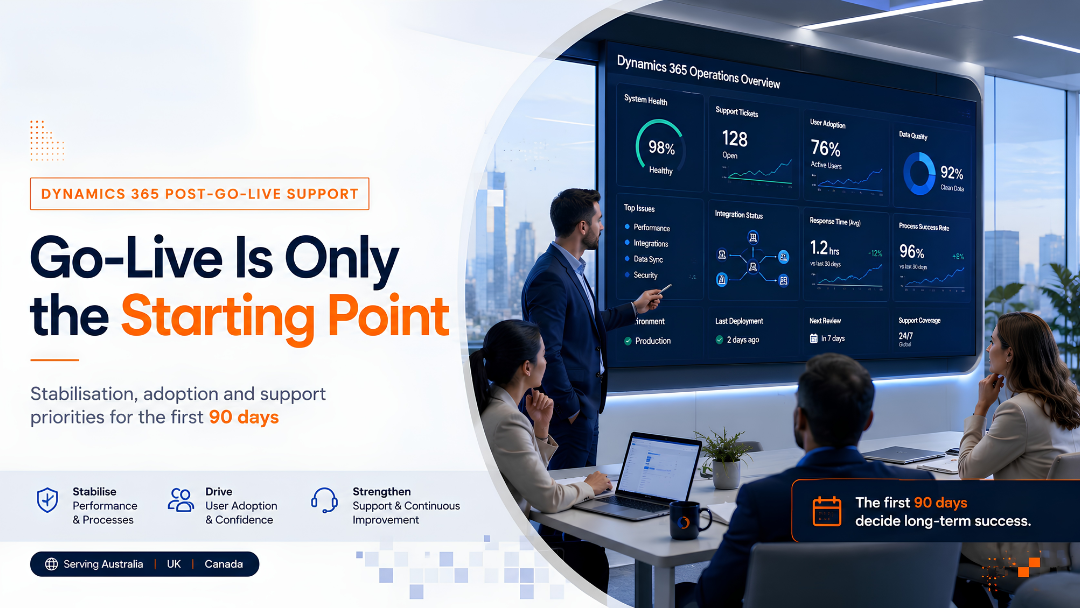

A Dynamics 365 go-live is a major milestone, but it is not the finish line. It is the point where planning, configuration, testing and training meet real business usage.
This is why Dynamics 365 post-go-live support matters. The first 90 days after launch often decide whether users trust the system, whether business processes stabilise and whether the implementation begins delivering measurable value.
Many organisations focus heavily on getting to go-live. They prepare the cutover, complete testing, conduct training and move users into the new system. But once the system is live, the nature of work changes. The project becomes an operating solution. Users begin raising practical questions. Data quality issues become visible. Process gaps surface. Reports are reviewed by leadership. Support teams must respond quickly.
Microsoft’s Dynamics 365 implementation guidance includes an “Operate” stage after preparation and deployment, reinforcing that long-term operation is part of the implementation lifecycle, not something separate from it.
For enterprise application owners, support leaders and transformation managers, the first 90 days need a structured plan. This article explains how to manage stabilisation, adoption and support priorities after Dynamics 365 goes live.
Why the First 90 Days Matter
The first 90 days are when the organisation discovers how well the solution performs outside project conditions.
During implementation, teams work in controlled environments. Testers follow scenarios. Stakeholders review planned workflows. Training is scheduled. Issues are managed through project governance.
After go-live, the system is used in live business conditions. Users work under time pressure. Data enters from real transactions. Approvals need to move. Integrations must run consistently. Managers expect reporting to support decisions.
Without structured Dynamics 365 post-go-live support, small issues can become major adoption problems. A slow response to user questions can reduce confidence. Unclear ownership can delay fixes. Poor monitoring can allow recurring problems to continue unnoticed.
The goal of the first 90 days is not just to fix defects. It is to move the system from launch mode to reliable business-as-usual operation.
What Dynamics 365 Post-Go-Live Support Should Cover
Effective Dynamics 365 post-go-live support should cover more than technical troubleshooting.
It should include:
- Hypercare and issue response
- User support and query handling
- Data-quality monitoring
- Integration monitoring
- Security and access management
- Report and dashboard validation
- Adoption tracking
- Enhancement prioritisation
- Knowledge transfer
- Transition to managed services or internal support
A strong support plan helps the organisation move from reactive issue handling to a controlled support model. Microsoft’s support-operations guidance highlights the need to plan and practise how support services will operate in real scenarios so the transition from project mode to support mode is smooth.
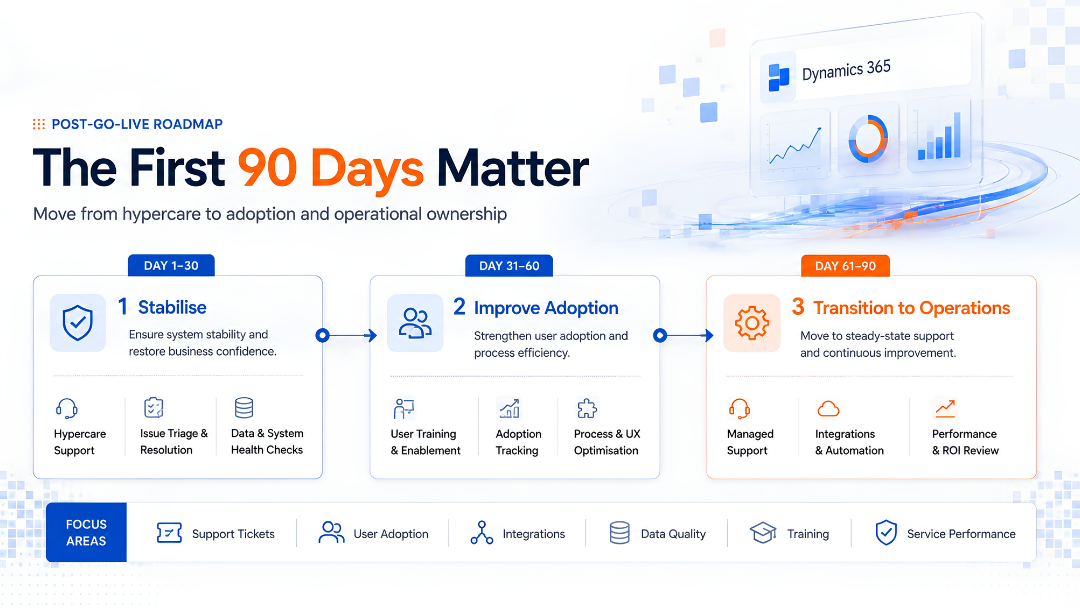
Days 1–30: Stabilise the System
The first 30 days should focus on stabilisation.
At this stage, users are still adjusting to the system. Support volumes may be higher. Questions may relate to navigation, access, process steps, missing data or unclear ownership.
The immediate priority is to make sure users can continue business operations without avoidable disruption.
Key priorities for days 1–30
Start with a clear hypercare model. Users should know where to raise issues, what information to provide and how urgent items will be handled.
Define the difference between:
- production defects
- user guidance questions
- access requests
- data corrections
- enhancement ideas
- training gaps
This classification helps support teams respond properly. Not every issue is a defect. Some issues indicate a need for better training. Others suggest missing process clarity. Some may be genuine technical defects that need immediate attention.
During the first 30 days, teams should also monitor integrations, workflows, critical business processes and reporting outputs. If orders, cases, opportunities, approvals or financial records are involved, the organisation needs confidence that key processes are running correctly.
Stabilisation checklist
For the first 30 days, Dynamics 365 post-go-live support should include:
- Daily issue review
- Clear escalation path
- Priority classification
- Access and role validation
- Integration monitoring
- Data-load validation
- Workflow and approval monitoring
- Daily or weekly business check-ins
- Knowledge-base updates
- User communication
The purpose is to restore confidence quickly whenever friction appears.
Days 31–60: Strengthen Adoption
Once the system is stable, the next priority is adoption.
A Dynamics 365 implementation can be technically live but still underused. Users may continue using spreadsheets. Managers may not trust reports. Teams may avoid new process steps. Some users may use the system only because they are required to, not because it helps them work better.
This is where Dynamics 365 post-go-live support must shift from fixing issues to improving usage.
What to monitor during days 31–60
Support leaders should begin reviewing adoption indicators such as:
- login frequency
- record creation and update patterns
- process completion rates
- dashboard usage
- open support tickets by category
- repeated user questions
- training attendance
- unresolved process confusion
- manual workarounds
These signals help identify whether adoption issues are technical, behavioural or process-related.
For example, if users are not updating opportunity stages, the issue may not be the system. It may be unclear sales-process ownership. If users are exporting data to Excel instead of using dashboards, the reporting design may need refinement. If support tickets repeat the same question, the team may need quick-reference guides or additional training.
Adoption support actions
During days 31–60, consider:
- Short refresher training sessions
- Role-based user clinics
- Quick guides for common tasks
- Manager dashboards for adoption tracking
- Process-owner reviews
- Targeted communication for recurring issues
- Floor-walking or live support sessions
- Feedback capture from high-volume users
Good adoption support is practical. It does not simply remind users to use the system. It removes friction and helps users understand how the system supports their work.
Days 61–90: Move Toward Operational Ownership
By the third month, the organisation should begin moving from hypercare to a sustainable operating model.
This is where many implementations lose discipline. The project team starts to step back, but business-as-usual support is not fully ready. Enhancement requests increase. Users expect quick changes. Internal teams may still depend heavily on the implementation partner.
A clear Dynamics 365 post-go-live support model prevents this gap.
Key decisions for days 61–90
By days 61–90, the organisation should answer:
- Who owns day-to-day support?
- Which issues remain with the implementation partner?
- Which issues move to internal IT or application support?
- What is the service-level expectation?
- How will enhancements be reviewed and prioritised?
- Who approves configuration changes?
- How will release updates be tested?
- What documentation must be maintained?
- What reports should leadership review regularly?
This stage is about operational maturity. The system should not depend only on project memory. It needs documented ownership, support processes and governance.
Build a Clear Support Model
A support model should define how users get help and how the solution continues to improve.
At minimum, the model should clarify:
- Support channels
- Ticket categories
- Severity levels
- Response expectations
- Escalation paths
- Business-process ownership
- Technical ownership
- Change-control rules
- Release management
- Reporting cadence
Microsoft’s Dynamics 365 support strategy guidance explains that organisations need to transition a launched system from a project into a supported solution that users rely on. A support strategy helps prepare, design and run that support model.
For organisations in Australia, the UK and Canada, this can become especially important when teams work across locations, time zones or regional business units. Support ownership should not depend on informal conversations. It should be visible, documented and measurable.
Manage Enhancements Carefully
After go-live, users often identify new requirements. Some are valid improvements. Some are requests to recreate old habits. Some are reactions to temporary discomfort with the new system.
Without governance, the enhancement backlog can grow quickly.
A strong Dynamics 365 post-go-live support model should include an enhancement review process. Each request should be assessed against:
- business value
- urgency
- user impact
- process alignment
- technical complexity
- reporting impact
- security implications
- release timing
Not every request should be actioned immediately. Some should be grouped into a planned release. Some should be handled through training. Others may reveal a genuine design gap.
The aim is to avoid turning the first 90 days into uncontrolled reconfiguration.
Keep Data Quality Visible
Data quality often becomes more visible after go-live because real users begin working with live records.
Common issues may include:
- incomplete customer or account records
- inconsistent naming conventions
- duplicate records
- incorrect ownership
- missing mandatory fields
- old migrated data affecting reports
- process stages not updated on time
Poor data quality can quickly reduce trust in the system. If leaders do not trust dashboards, they may return to manual reporting. If users do not trust records, they may create workarounds.
During the first 90 days, Dynamics 365 post-go-live support should include active data-quality monitoring. Business owners should review key fields, duplicate trends and report reliability.
Data quality is not only an IT responsibility. It requires business ownership, user discipline and clear rules.
Monitor Integrations and Automation
Integrations and automations should be actively monitored after go-live.
Even if integrations passed testing, live usage can reveal issues related to volume, timing, source-data quality or downstream dependencies.
Monitor:
- failed integration jobs
- delayed data movement
- duplicate records
- missing transactions
- approval workflow failures
- email or notification issues
- Power Automate flow errors
- API or connector failures
Integration issues can affect user trust quickly because they often appear as missing data or broken processes.
Support teams should have a clear owner for each integration. They should also know what business process is affected if the integration fails.
Measure Support Performance
Support performance should be reviewed regularly during the first 90 days.
Useful metrics include:
- number of open tickets
- ticket volume by category
- average response time
- average resolution time
- recurring issues
- critical defects
- training-related queries
- adoption-related queries
- enhancement requests
- unresolved escalations
These metrics help leadership understand whether the system is stabilising or whether deeper intervention is needed.
The goal is not to create reporting for its own sake. The goal is to make support visible so decisions can be made early.
Transition to Managed Services
For many organisations, the first 90 days reveal whether internal teams have enough capacity to support Dynamics 365 effectively.
A managed-services model can help when the organisation needs ongoing support for:
- user queries
- defect resolution
- configuration changes
- reporting updates
- release testing
- integrations
- environment management
- automation support
- enhancement delivery
This does not mean every organisation should outsource support completely. The right model may combine internal ownership with external delivery support.
The important point is that Dynamics 365 post-go-live support should be intentional. It should not depend on whoever is available after the project team moves on.
Common Mistakes After Dynamics 365 Go-Live
Several post-go-live mistakes are common:
- Ending hypercare too early
- Treating all issues as technical defects
- Ignoring user adoption signals
- Letting enhancement requests bypass governance
- Failing to monitor integrations
- Leaving data quality to IT alone
- Not documenting support ownership
- Allowing project knowledge to disappear
- Delaying release and update planning
- Measuring go-live success only by deployment completion
The strongest implementations avoid these mistakes by treating the first 90 days as a structured transition period.
90-Day Dynamics 365 Post-Go-Live Support Plan
Here is a simple structure organisations can use.
Days 1–30: Stabilise
Focus on issue response, access, integrations, workflows, critical defects and business continuity.
Days 31–60: Improve Adoption
Focus on training gaps, usage patterns, reporting confidence, user behaviour and process discipline.
Days 61–90: Transition to Operations
Focus on ownership, managed services, enhancement governance, release planning, support metrics and continuous improvement.
This structure helps teams move from reactive support to controlled operations.
Final Thought
A Dynamics 365 go-live proves that the system is ready to enter live use. It does not prove that the organisation is fully ready to operate, support and improve the system over time.
That is why Dynamics 365 post-go-live support is a critical part of implementation success.
The first 90 days should help the organisation stabilise the system, strengthen adoption and transition into a reliable support model. When this stage is handled well, Dynamics 365 becomes more than a completed project. It becomes a platform for measurable operational improvement.
How Osmosys Can Help
Osmosys helps organisations plan, implement and support Microsoft business applications with practical delivery discipline.
Our teams can support:
- Dynamics 365 post-go-live support
- Hypercare planning
- Application stabilisation
- User adoption support
- Managed services
- Enhancement backlog management
- Integration and automation support
- Release and update readiness
- Ongoing application improvement
FAQs
What is Dynamics 365 post-go-live support?
Dynamics 365 post-go-live support is the structured support provided after a Dynamics 365 solution goes live. It typically includes hypercare, issue resolution, user support, adoption monitoring, data-quality checks, integration monitoring and transition to business-as-usual support.
Why are the first 90 days after Dynamics 365 go-live important?
The first 90 days reveal how the solution performs in real business conditions. This period helps teams stabilise the system, resolve user issues, improve adoption and define long-term support ownership.
What should be included in a Dynamics 365 post-go-live support plan?
A Dynamics 365 post-go-live support plan should include support channels, issue categories, escalation rules, response expectations, adoption tracking, integration monitoring, data-quality review, enhancement governance and transition to managed services.
How long should Dynamics 365 hypercare last?
Hypercare length depends on project complexity, user volume and business criticality. Many organisations use the first 30 days for intensive stabilisation, followed by structured adoption and operational-transition support through the first 90 days.
When should a company consider managed services for Dynamics 365?
A company should consider managed services when internal teams do not have enough capacity, specialist knowledge or availability to handle ongoing support, enhancements, integrations, release testing and user adoption needs.