


AI is now firmly part of the business applications conversation.
For UK organisations using Microsoft Dynamics 365, the question is no longer only whether Copilot can help sales, service, finance, or operations teams work faster. The better question is whether the data inside the system is strong enough for Copilot to be useful in the first place.
That is where the real return on investment begins.
Microsoft’s 2026 release wave 1 for Dynamics 365 continues to push AI-powered and agentic business application experiences across sales, service, finance, supply chain, commerce, HR, projects, and ERP. Microsoft also notes that these updates bring deeper Copilot integration, intelligent automation, unified customer and operational data, and cross-app capabilities.
At the same time, Microsoft’s own Dynamics 365 Copilot guidance makes the foundation clear: Dynamics 365 brings AI into business processes by using data, automation, and real-time decision support across ERP and CRM. Dynamics 365 apps such as Sales, Customer Service, and Customer Insights are model-driven apps built on Power Apps and run on Microsoft Dataverse.
That matters because Copilot does not create business truth on its own.
It works with the data, permissions, records, context, and process structure available to it. If the CRM is full of duplicates, outdated contacts, incomplete opportunities, unclear ownership, inconsistent fields, and weak activity history, Copilot will not magically produce reliable business insight.
It may simply make poor data easier to consume.
For UK business leaders, IT teams, CRM owners, and sales operations teams, this is the practical issue behind Dynamics 365 Copilot ROI: before expecting better AI output, the organisation needs better data discipline.
Why Copilot ROI Starts Before Copilot Is Switched On
Copilot in Dynamics 365 Sales is designed to help sellers be more productive. Microsoft describes it as an AI assistant that can summarise opportunity and lead records, help users catch up on recent changes, prepare for meetings, read account news, and answer natural language questions using sales records and sales-specific terms.
That sounds powerful.
But each of those capabilities depends on the quality of the underlying data.
If an opportunity summary pulls from weak fields, missing stakeholder notes, outdated close dates, or incomplete next steps, the summary may look neat but still fail to help the seller make a better decision.
If a meeting preparation prompt depends on poor account history, scattered notes, and inconsistent contact records, the output may feel convenient but not commercially useful.
If a seller asks Copilot about recent changes but the team has not maintained activity discipline, Copilot has less meaningful context to work with.
This is why data quality for AI is not a technical clean-up task. It is a commercial readiness issue.
Good data improves the chance that Copilot outputs are:
→ relevant
→ timely
→ trustworthy
→ role-specific
→ easier to act on
→ aligned with the real customer situation
Poor data does the opposite. It creates polished uncertainty.
The Problem Is Not AI. The Problem Is CRM Reality.
Many Dynamics 365 environments have grown over years.
They often include:
→ migrated legacy CRM data
→ duplicate accounts and contacts
→ old opportunities that were never closed properly
→ inconsistent lead sources
→ missing industry or segment fields
→ weak relationship mapping
→ poor activity logging
→ manually maintained Excel sheets outside CRM
→ unclear ownership between sales, service, and delivery teams
None of this is unusual.
But when Copilot enters the picture, these weaknesses become more visible.
Before AI, poor CRM data mostly affected reports, pipeline reviews, segmentation, and handovers. With Copilot, the same poor data can now affect summaries, recommendations, meeting preparation, follow-ups, and user trust in AI-generated assistance.
This is where CRM data quality becomes central to Copilot ROI.
A Copilot rollout should not start with the question:
“How quickly can we enable this feature?”
It should start with:
“Which business decisions do we expect Copilot to support, and is the data good enough to support them?”
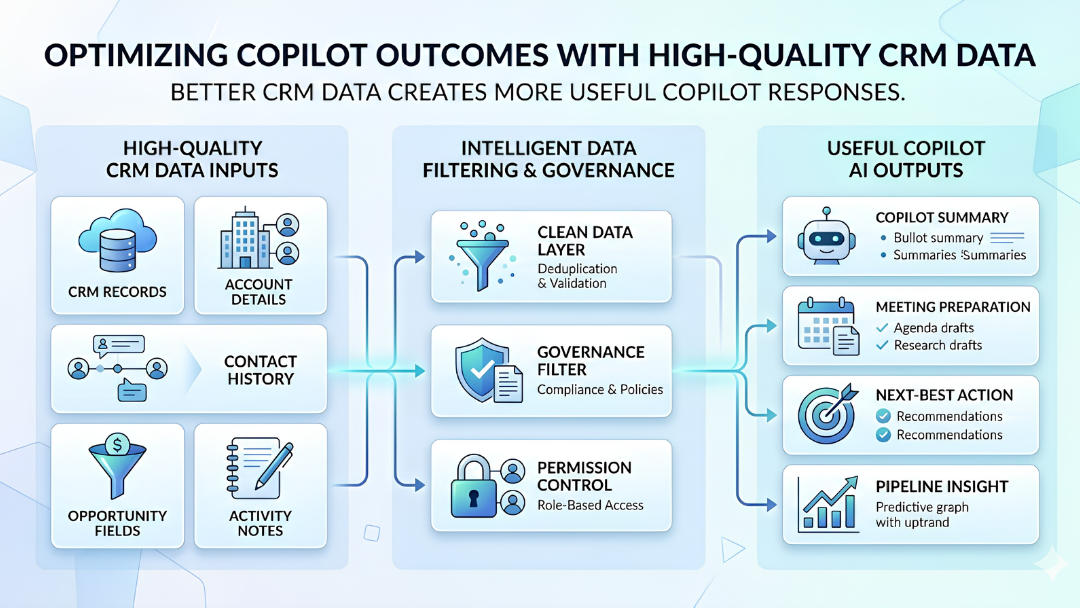
What Good CRM Data Quality Looks Like for Copilot
For Copilot to support useful work in Dynamics 365, the CRM does not need to be perfect.
But it does need to be reliable in the areas that matter most.
Good Copilot readiness usually depends on six data conditions.
1. Records Are Complete Enough to Summarise
Copilot is good at summarising. But summarisation only helps when the underlying record contains meaningful information.
For example, an opportunity summary is more useful when the record includes:
→ customer need
→ estimated value
→ decision timeline
→ stakeholders
→ competitor context
→ risks
→ next step
→ recent activity
→ close probability
→ owner accountability
If those details are missing, the summary will either be shallow or dependent on fragments.
The goal is not to force users to fill every possible CRM field. The goal is to identify which fields create real decision value and make those fields part of the operating rhythm.
2. Duplicate Records Are Under Control
Duplicate records are one of the fastest ways to weaken Copilot trust.
If the same customer exists as multiple accounts, if contacts are split across duplicate records, or if leads are repeated across teams, Copilot may surface incomplete or confusing context.
Microsoft Dataverse includes duplicate detection capabilities to help identify potential duplicates in active records such as accounts and contacts. Microsoft also notes that duplicate records can enter through manual data entry or bulk imports.
For Copilot readiness, duplicate control should cover:
→ accounts
→ contacts
→ leads
→ opportunities
→ customer hierarchies
→ key account ownership
This matters because AI output is only useful when users trust the source behind it.
3. Ownership Is Clear
Copilot can help users work faster, but it cannot fix organisational ambiguity.
If records do not have clear owners, teams may still struggle with:
→ who should follow up
→ who owns the customer relationship
→ who updates the opportunity
→ who is responsible for account history
→ who validates closed-lost reasons
→ who resolves duplicate records
Good data quality needs clear ownership.
That means every critical record type should have a business owner, not just a system owner.
A CRM admin can maintain the platform.
But sales, service, marketing, and account teams must own the quality of the business data.
4. Activity History Reflects Real Work
Copilot becomes more useful when it has a better picture of what has actually happened.
That includes:
→ calls
→ meetings
→ emails
→ customer concerns
→ proposal updates
→ internal handovers
→ service issues
→ next actions
If teams keep important context outside Dynamics 365, Copilot’s view becomes partial.
This does not mean every interaction needs excessive documentation. It means the key activities that shape decisions should be captured consistently enough for both humans and AI to understand the account or opportunity.
5. Field Definitions Are Consistent
A CRM field is only useful when teams interpret it the same way.
For example:
→ What counts as a qualified lead?
→ What does “proposal sent” mean?
→ When should an opportunity move to negotiation?
→ Who updates expected close date?
→ What does “at risk” mean?
→ Which industry classification should be used?
If every team interprets fields differently, reporting becomes weak and Copilot context becomes uneven.
This is a common issue in multi-region or multi-business-unit organisations.
For UK teams working with global sales, service, or delivery teams, field governance matters because Copilot may operate across records created by different teams with different habits.
6. Permissions and Data Access Are Well Governed
Copilot readiness is not only about clean data. It is also about controlled data.
Microsoft states that Copilot in Dynamics 365 Sales can only get information from records and files that the signed-in user has access to. Microsoft’s enterprise data protection guidance for Microsoft 365 Copilot also explains that access controls and policies apply to Copilot, including identity model, permissions, sensitivity labels, retention policies, audit of interactions, and administrative settings, depending on the subscription plan.
For UK organisations, this is especially important because AI adoption needs to sit within data protection expectations. The ICO’s AI and data protection guidance highlights accountability, governance, transparency, accuracy, fairness, security, and data minimisation as key areas for organisations using AI.
That does not mean every Copilot project should become slow or legal-heavy.
It means access, sensitivity, and governance should be designed before broad adoption, not after a mistake.
Why Poor Data Quality Reduces Copilot ROI
Poor data quality affects Copilot ROI in four practical ways.
1. Users Stop Trusting the Output
If Copilot summaries repeatedly miss important context or surface outdated information, users stop trusting them.
Once trust drops, adoption becomes difficult.
The issue may not be Copilot itself. It may be that the CRM record is incomplete, duplicated, or badly maintained.
2. AI Saves Time in the Wrong Places
Copilot may reduce the time needed to summarise a record. But if the record is poor, users still need to verify, correct, and rebuild the context manually.
That means the time saving becomes questionable.
The organisation may feel it has adopted AI, but users are still doing hidden clean-up work in the background.
3. Managers Get Cleaner-Looking but Weaker Insight
AI-generated summaries can make reporting feel more polished.
But polish is not the same as accuracy.
If pipeline stages, close dates, forecast categories, or activity records are inconsistent, Copilot can make weak information look more confident than it should.
That creates a leadership risk: decisions may be made faster, but not necessarily better.
4. Adoption Becomes a Feature Rollout Instead of a Behaviour Change
Many teams treat Copilot adoption as a licence or enablement exercise.
But real adoption depends on behaviour.
Users need to trust the data, understand when to rely on Copilot, know when to verify output, and maintain CRM hygiene because they can see the value of doing so.
Without that, Copilot becomes another feature that looks strong in a demo and weak in everyday use.
A Practical Copilot Readiness Checklist for Dynamics 365
Before expanding Copilot usage in Dynamics 365, review these areas.
Data Completeness
→ Are key account, contact, lead, and opportunity fields consistently completed?
→ Are next steps, timelines, and stakeholders visible?
→ Are critical service or customer history details captured in the right place?
Duplicate Control
→ Are duplicate accounts, contacts, and leads reviewed regularly?
→ Are duplicate detection rules active and relevant?
→ Are users trained on merging or resolving duplicate records?
Activity Discipline
→ Are important calls, meetings, emails, and notes captured consistently?
→ Is customer context stored in Dynamics 365 or scattered across inboxes and spreadsheets?
→ Are sales and service teams following the same record update standards?
Governance
→ Who owns CRM data quality by function?
→ Who approves new fields, forms, workflows, and automations?
→ How often are data quality issues reviewed?
Security and Access
→ Do users have access only to the records and files they should see?
→ Are sensitivity, retention, and audit controls understood?
→ Are Copilot use cases reviewed against internal data policies?
Adoption
→ Do users know which Copilot outputs they can trust?
→ Do teams understand how data quality affects AI output?
→ Is Copilot adoption measured by useful behaviour, not just licence activation?
What UK Organisations Should Prioritise First
For UK organisations, the right starting point is not a broad data clean-up project with no end date.
The better approach is to focus on the records and workflows where Copilot will be used first.
Start with Sales and Customer Records
If the first Copilot use cases are in sales, start with:
→ accounts
→ contacts
→ leads
→ opportunities
→ activities
→ meeting notes
→ customer emails
→ pipeline stages
These are the records that will shape meeting preparation, opportunity summaries, follow-ups, and account context.
Fix the Fields That Drive Decisions
Do not clean every field equally.
Prioritise fields that influence:
→ forecast accuracy
→ sales prioritisation
→ customer segmentation
→ opportunity risk
→ account ownership
→ renewal or expansion potential
→ service escalation
If a field does not affect decisions, reporting, automation, or AI output, it may not deserve immediate attention.
Create a Data Quality Rhythm
CRM data quality should not be a one-time campaign.
Set a monthly rhythm to review:
→ duplicate records
→ incomplete high-value opportunities
→ stale close dates
→ missing next steps
→ poor activity capture
→ unused fields
→ inconsistent stage movement
→ adoption feedback
This rhythm turns Copilot readiness into an operating habit.
Make Data Quality Visible to Users
Users maintain data better when they understand why it matters.
Instead of saying, “Update the CRM because management needs reports,” the message should be:
“Better data helps Copilot give you better summaries, better meeting preparation, and better customer context.”
That connects CRM hygiene to user value.
The Role of Dataverse in Copilot Readiness
Because many Dynamics 365 apps run on Microsoft Dataverse, Dataverse is central to how business data is structured and governed.
Microsoft describes Dataverse as a secure data platform that lets organisations store and manage data used by business applications, with data stored in tables made up of rows and columns.
For Copilot readiness, Dataverse discipline matters because it influences:
→ table structure
→ field consistency
→ security roles
→ duplicate detection
→ relationships between records
→ app behaviour
→ reporting readiness
→ automation quality
When Dataverse is treated as a structured business data layer, Copilot has stronger context to work with.
When Dataverse is treated as a place where teams keep adding fields, forms, and tables without governance, complexity grows and AI usefulness weakens.
What Good Copilot ROI Should Look Like
Copilot ROI should not be measured only by whether users try the feature.
It should be measured by whether Copilot helps teams make work faster, clearer, or more reliable.
Practical indicators may include:
→ less time spent preparing for customer meetings
→ faster opportunity review
→ better follow-up consistency
→ improved CRM completion rates
→ fewer duplicate records
→ better forecast conversations
→ stronger seller adoption of CRM
→ clearer account handovers
→ reduced manual summary work
→ more useful pipeline reviews
The most important shift is this:
Copilot ROI is not only an AI metric.
It is a data quality, process, and adoption metric.
If the CRM improves because Copilot makes data quality visible, that is part of the return.
Final Thought
Dynamics 365 Copilot can help teams move faster, but it cannot replace business data discipline.
For UK organisations, this is the right moment to review Copilot readiness more seriously. Microsoft is continuing to expand AI and agentic capabilities across Dynamics 365, while data protection, governance, and accountability expectations remain important parts of responsible AI adoption.
The organisations that gain the most from Copilot will not simply be the ones that enable it first.
They will be the ones that prepare their CRM data, clarify ownership, strengthen governance, and help users understand how better data leads to better AI output.
Because Copilot can summarise, suggest, and assist.
But the quality of what it returns still depends on the quality of what your business has captured.

If your team is exploring Copilot in Dynamics 365, start by reviewing the quality of the CRM data behind it.
Osmosys helps organisations strengthen Dynamics 365 data quality, improve CRM governance, and prepare business applications for practical AI adoption.
Talk to Osmosys about building a cleaner, more reliable Dynamics 365 foundation for Copilot.
FAQs
What is Dynamics 365 Copilot?
Dynamics 365 Copilot refers to Microsoft’s AI-powered assistance across Dynamics 365 applications. It helps users summarise records, ask questions, prepare for work, access business context, and complete tasks faster inside Dynamics 365 apps.
Why does data quality matter for Dynamics 365 Copilot?
Data quality matters because Copilot uses available business data, records, context, and permissions to generate responses. If CRM data is incomplete, duplicated, outdated, or inconsistent, Copilot outputs may be less useful or less trustworthy.
What is Copilot readiness in Dynamics 365?
Copilot readiness means preparing your Dynamics 365 environment so Copilot can work with reliable, secure, and useful data. This includes CRM data quality, duplicate control, clear ownership, activity discipline, access governance, and user adoption planning.
How can organisations improve CRM data quality for AI?
Organisations can improve CRM data quality by cleaning duplicate records, standardising key fields, improving activity capture, assigning record ownership, reviewing stale opportunities, strengthening Dataverse governance, and making data quality part of regular sales and service operations.
What should UK organisations consider before adopting Copilot?
UK organisations should review data protection, access controls, permissions, sensitivity, auditability, CRM data quality, and AI governance before scaling Copilot adoption. This helps ensure Copilot is useful, secure, and aligned with responsible AI expectations.