


If your teams don’t trust the data, they won’t use it. And if they can’t use it, cloud modernization turns into “new infrastructure, same confusion.”
This becomes even more visible when AI enters the conversation. Copilots, analytics, and automation don’t fix messy ownership, unclear definitions, or uncontrolled access. They amplify whatever foundation you already have.
The motivation isn’t abstract. IBM’s Cost of a Data Breach Report pegs the global average breach cost in the millions of USD per incident, which is enough to make “governance later” a business risk—not an IT preference.
This post is a practical guide to building governed, trustworthy data foundations using Microsoft Purview, with a step-by-step framework, a healthcare migration scenario, and a checklist you can apply to your next Azure or Dynamics 365 program. (This is not legal advice—treat compliance notes as high-level guidance and validate with your legal/security teams.)
Why data governance is the backbone of cloud modernization (and AI readiness)
Most cloud programs don’t fail because teams can’t move data. They struggle because teams can’t answer basic questions consistently:
- What is the “right” customer record?
- Which datasets contain sensitive personal information?
- Who owns the data product—and who approves access?
- Can we prove where a number came from (lineage) when a leader challenges it?
Governance is how you make those answers repeatable.
A governed data foundation helps you:
- Reduce rework caused by inconsistent definitions and duplicated datasets
- Improve decision confidence by clarifying lineage and ownership
- Control risk through classification, access policies, and auditing
- Scale responsibly across regions, business units, and platforms
Microsoft frames Purview’s governance capabilities around visibility, confidence, and responsible innovation—especially relevant as organizations build for the era of AI.
What Microsoft Purview does in a modern data governance setup
Microsoft Purview is often introduced as “data cataloging.” In practice, it’s a governance layer that helps you inventory data, understand it, classify it, and manage how it’s accessed and used—across a heterogeneous estate.
Key capabilities to understand (and how they map to real delivery work):
1) Data discovery + inventory (know what exists)
You can’t govern what you can’t see. A real program starts with building an inventory of data assets and their metadata—across sources.
2) Catalog + business context (make it usable)
A catalog isn’t valuable because it exists—it’s valuable because people can find the right dataset, understand what it means, and know whether they’re allowed to use it.
Microsoft’s newer Purview Unified Catalog experience emphasizes governance domains, critical data elements, and policy-driven access—designed for scaling governance in large environments.
3) Lineage (prove where data came from)
When leaders challenge a number, “trust me” doesn’t work. Lineage helps teams show how data moved and transformed—supporting both operational confidence and auditability.
4) Classification + compliance signals (treat sensitive data differently)
Purview supports understanding and governing sensitive data types so your controls match the risk profile—especially important for regulated data and cross-region operations.
5) Access policies + right-use controls (balance safety and self-service)
Governance that blocks work creates shadow systems. Governance that enables safe self-service is what scales. Purview’s access-policy direction is explicitly designed to pair access with right-use requirements.
A practical framework: “Trust by Design” in 6 steps
This is the version of governance that holds up in real cloud projects—not a document-heavy effort that teams ignore.
Step 1: Define the trust scope (what “must be governed”)
Start by identifying:
- Critical data elements (e.g., Customer, Patient, Asset, Contract, Incident)
- The top 5–10 decisions leaders make that depend on those elements
- The systems involved (Dynamics 365, data lake, ERP, support tools, spreadsheets)
Outcome: a short list of “data that matters,” not an impossible mandate to govern everything.
Step 2: Set governance roles that match delivery reality
Governance fails when ownership is vague. Assign:
- Data owner (accountable for policy and definition)
- Data steward (maintains metadata, quality rules, glossary)
- Platform owner (security, infrastructure, and access enforcement)
- Consumers (teams who use data and request changes)
Keep it practical: if you can’t name the owner, the dataset is not production-ready.
Step 3: Build the catalog around how teams search (not how IT stores)
Organize by business-aligned domains (finance, sales, operations, clinical, etc.). The goal is discoverability:
- Clear dataset names
- Plain-language descriptions
- Data freshness expectations
- “Known limitations” and intended usage
Purview’s governance-domain concept supports this style of scaling.
Step 4: Classify sensitive data early (so controls aren’t an afterthought)
Do this before you open broad access:
- Identify personal, financial, and health-related fields
- Define handling rules (masking, restricted access, retention)
- Separate non-sensitive analytics datasets from raw sensitive data where appropriate
This is where teams often get stuck because they discover sensitive fields after dashboards are built.
Step 5: Implement access as a workflow (fast, auditable, and consistent)
A good pattern is:
- Standard access request path
- Clear approval rules tied to owners and purpose
- Time-bound access where appropriate
- Audit logging for who accessed what and when
Purview’s direction here is to balance self-service with enforcement and compliance context.
Step 6: Operationalize governance (treat it like a product, not a project)
Governance isn’t a one-time setup. Put it on a cadence:
- Monthly stewardship review (quality + definitions)
- Quarterly policy review (access + compliance changes)
- Incident loop (when a data issue happens, fix the root cause and update rules)
Example scenario: a healthcare cloud migration that doesn’t break trust

Imagine a healthcare provider modernizing case management and analytics:
- Clinical and service teams use Dynamics 365 for workflows
- Data is consolidated into Azure for reporting and operational insights
- The organization must protect patient information under HIPAA requirements
HIPAA’s Privacy Rule is designed to protect individually identifiable health information, and covered entities must be deliberate about how that data is used and disclosed.
In a “trust by design” migration, the program would:
- Classify patient data fields early and restrict access by role and purpose
- Catalog approved datasets so teams don’t export sensitive data into uncontrolled spreadsheets
- Use lineage and stewardship to explain what a metric means (and how it was calculated)
- Put access requests on a defined workflow so audits don’t become a scramble
The result isn’t just “compliance.” It’s confidence: teams can move faster because they aren’t guessing which dataset is safe to use.
The 10 must-haves checklist (asset)
Asset: 10 Data Governance Must-Haves in Cloud Projects (turn this into a one-page PDF/infographic for the post)
- Named owners for critical datasets
- Business glossary for key terms (Customer, Revenue, Case, etc.)
- Governance domains aligned to how the business operates
- Catalog coverage for priority systems (not everything, but what matters)
- Data classification for sensitive fields
- Access workflows with approvals and audit trails
- Lineage for executive-facing dashboards/metrics
- Quality rules + thresholds for trusted datasets
- Regular stewardship cadence (monthly/quarterly)
- A feedback loop: how issues get reported, fixed, and prevented
Region angle: what changes across ANZ, US, and Canada
If you operate across regions, governance has to support multiple privacy expectations—without building three separate platforms.
- Australia (ANZ): The Australian Privacy Principles (APPs) are a core part of the Privacy Act framework.
- United States: Privacy expectations vary by state; California’s CCPA is a widely-referenced baseline for consumer privacy rights.
- Canada: PIPEDA is the federal private-sector privacy law—relevant for organizations handling personal information in commercial activities.
For global companies (including those in Canada and ANZ serving EU residents), GDPR may also be in scope depending on where data subjects are and how processing occurs.
The practical takeaway: design governance so policies, classification, and auditing are consistent—then adapt controls where regional requirements differ.
Common pitfalls (and how to avoid them)
Pitfall 1: Treating governance as documentation
If it lives only in a slide deck, it won’t survive delivery pressure. Build governance into workflows: access, ownership, and publishing.
Pitfall 2: Tool-first thinking
Microsoft Purview is an enabler, not the strategy. Start with decisions, data products, and ownership—then configure tools to support that reality.
Pitfall 3: Over-restricting access (creating shadow systems)
If approvals take weeks, teams will export data elsewhere. Use safe self-service patterns with auditability.
Pitfall 4: Ignoring AI readiness
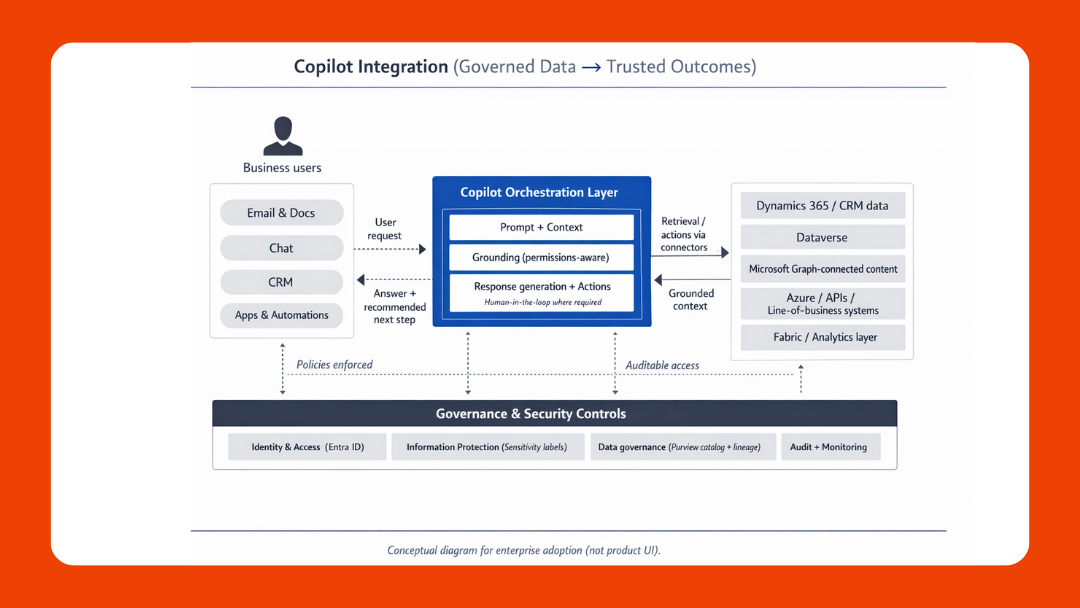
If your goal includes copilots or automation, governance needs to define what data is approved for those workflows and what needs redaction, masking, or tighter controls.
Implementation success metrics (what to measure)
Keep metrics simple and outcome-linked:
- % of priority datasets with named owner + steward
- Median time to approve/deny data access requests
- % of executive dashboards with lineage documented
- Reduction in duplicate datasets for the same business concept
- Data quality incidents per month (and time to resolution)
- Adoption: catalog searches, dataset subscriptions, approved usage growth
Modernization that earns trust
Cloud projects move faster when the foundation is trusted. Governance isn’t bureaucracy—it’s how you make data usable, secure, and explainable across teams and regions.
And if AI is on your roadmap, this matters even more. The organizations that get value from copilots and automation usually have one thing in common: they know what data they have, who owns it, and how it’s allowed to be used.

Book a Data Governance Consultation with Osmosys—get a practical maturity assessment and a roadmap you can execute in the next 90 days.
FAQs
What is Microsoft Purview used for?
Microsoft Purview helps organizations govern and secure data by improving visibility, cataloging, compliance support, and policy-driven controls across data estates.
Do small teams need data governance?
Yes—especially if you’re migrating to cloud, building executive dashboards, or introducing automation. Start small with critical data elements and clear ownership, then scale.
How does governance support AI initiatives?
AI depends on trusted, well-defined, appropriately controlled data. Governance clarifies what data is approved for use, who owns it, and how it should be accessed and monitored.
What regulations should ANZ, US, and Canada teams consider?
Common reference points include Australia’s APPs, California’s CCPA, and Canada’s PIPEDA. Applicability depends on your operations and where your customers/data subjects are.