


Power Platform governance has moved from a “good to have” discussion to a board-level operational concern.
That shift is not happening in isolation. Microsoft’s 2026 release wave 1 puts fresh emphasis on governance and administration, with new capabilities around tenant-level insights, automation, and admin visibility. At the same time, UK organisations are working in a climate where AI use, automated decision-making, and secure deployment are receiving closer regulatory and cyber scrutiny. Microsoft is adding more governance muscle into the platform, while UK regulators are making it clear that automation without safeguards is not good enough.
That is why this conversation matters now.
For many organisations, the first phase of Power Platform adoption was exciting. A few teams built useful apps. A few flows removed manual work. A few business users proved they could solve problems faster than traditional delivery models allowed.
Then scale happened.
Suddenly, there were dozens of apps, unclear ownership, duplicated flows, connector questions, data access concerns, inconsistent naming, and a default environment doing far more than anyone originally intended. That is usually the point where leadership realises the issue is not whether Power Platform works. The issue is whether the organisation can keep using it confidently as adoption grows.
That is what power platform governance is really about.
Table of Contents
What power platform governance actually means
Power Platform governance is not about slowing makers down.
It is the operating model that lets the platform grow without becoming messy, risky, or difficult to support. In practice, that means putting clear rules around environments, data access, connectors, ownership, security, lifecycle management, and monitoring. Microsoft’s own governance guidance frames this around security, compliance, efficiency, scalability, defined roles, and a deliberate delivery model rather than ad hoc growth.
Good governance gives makers room to build.
Good governance gives IT confidence that what gets built can be supported.
Good governance gives leadership evidence that innovation is happening under control.
Without that balance, organisations end up in one of two bad states: either the platform becomes too restricted to be useful, or it becomes so open that it turns into another shadow IT problem.
For UK organisations, that balance is especially important. The current AI and automation conversation is no longer only about productivity. It is also about transparency, data protection, cyber resilience, and being able to explain how systems are being used. The ICO’s AI guidance remains active and under review in light of legal changes, and the NCSC continues to stress that AI systems must be deployed and operated securely across their life cycle.
Why governance is more urgent in 2026
In 2026, Power Platform is not just about apps and flows. It is increasingly tied to copilots, agents, broader automation, and deeper business process integration.
Microsoft’s 2026 wave 1 plan for Power Platform governance and administration introduces new capabilities designed to make governance more proactive. One example is the Agentic Center of Enablement, which brings AI-powered agents into the admin experience to surface tenant changes, identify governance issues, prioritise risks, and generate remediation plans with an audit trail. Microsoft is also introducing a new Usage page in the admin centre to provide more authoritative usage analytics across Power Apps, Power Automate, and Copilot Studio, including trendlines and engagement metrics.
That matters because governance in 2026 cannot rely on occasional clean-up.
If your organisation is using apps, flows, copilots, or agents across multiple business units, governance has to become part of day-to-day platform operations. The question is no longer “Do we need governance?” The real question is “Can we still see what is happening, who owns it, where it lives, what data it touches, and whether it should still exist?”
The most common signs your governance model is already under strain
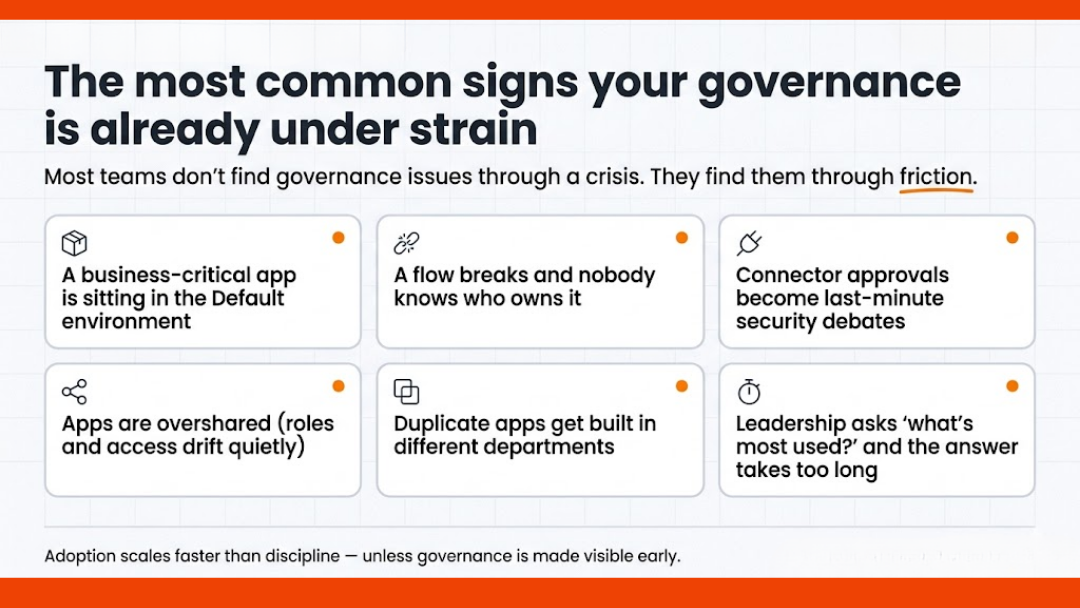
Most organisations do not discover governance problems through a dramatic failure.
They discover them through friction.
A business-critical app turns out to be sitting in the default environment.
A flow breaks and no one knows who owns it.
A connector request becomes a last-minute security discussion.
An app is shared too broadly.
A team builds the same thing twice in two different departments.
A maker leaves, but their work remains in production.
Leadership asks which apps are most used, and the answer takes too long to produce.
These are not edge cases. They are what happens when adoption moves faster than operating discipline.
Microsoft’s own guidance around managing the default environment highlights exactly these concerns, including ownerless resources, unused assets, widely adopted apps living in the default environment, and the need to limit oversharing and improve visibility.
A practical governance model for scaling Power Platform
The strongest governance models are not the most complicated ones. They are the ones that are easiest to understand, easiest to follow, and hardest to bypass.
Here is a practical model that works well for growing organisations.
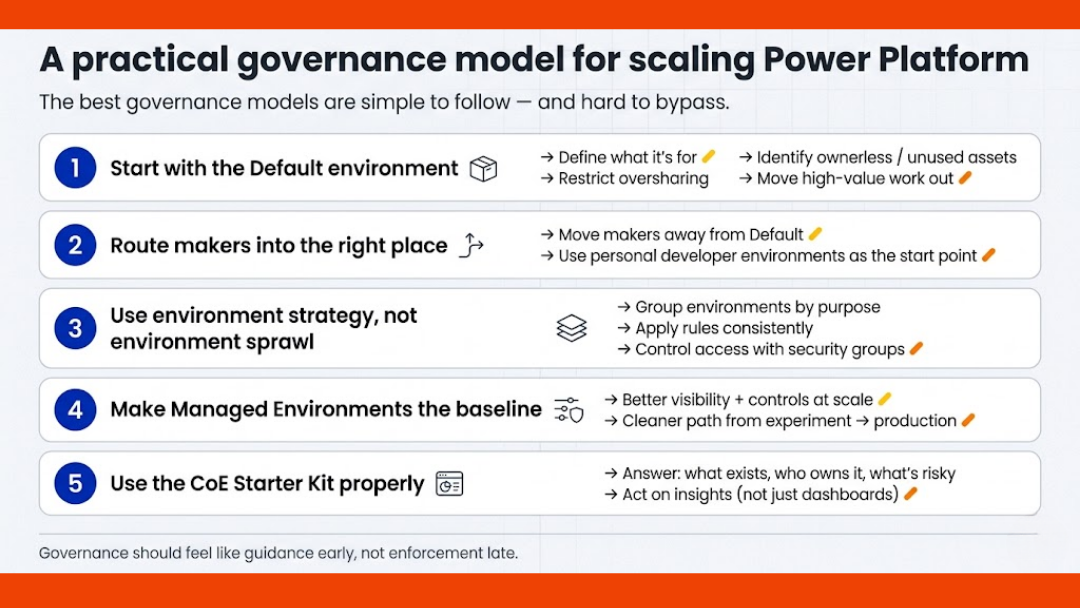
1) Start with the default environment
If you do nothing else, get control of the default environment first.
The default environment is where governance debt quietly builds up because it is easy to ignore until too much lives there. Microsoft’s guidance recommends actively governing it through Managed Environments features, sharing limits, usage insights, IP-based controls, recommendations, and maker guidance. It also recommends using the default environment carefully, because apps created there can become widely adopted or even business-critical without proper lifecycle controls.
This is where many organisations should begin:
- define what the default environment is for
- restrict broad sharing where appropriate
- review ownerless and unused assets
- identify high-value apps that need to move elsewhere
- communicate the rules clearly to makers
Governance often fails not because the rules are weak, but because the platform never tells people where they should build in the first place.
2) Move makers away from the default environment
One of the most useful governance moves in the current Microsoft stack is environment routing.
Environment routing allows admins to direct makers away from the default environment and into personal developer environments when they enter Power Apps, Power Automate, Copilot Studio, or Power Automate for desktop. Microsoft positions this as a safer place for personal development work, especially for makers working with Dataverse. The broader environment strategy guidance also treats moving makers away from the default environment as a key part of scaling adoption.
This matters because it solves a very common problem: people build in the wrong place simply because that is where they land.
If the platform can guide makers into the right starting point automatically, governance becomes easier without feeling heavy-handed.
That is a much better experience than cleaning up after the fact.
3) Use environment strategy, not environment sprawl
As adoption grows, environment management becomes a design problem.
Microsoft now offers environment groups to help organise environments into logical collections and apply rules consistently at scale. The platform guidance explicitly positions environment groups and rules as a way to manage environments in bulk and reduce manual effort, especially when organisations have large numbers of environments to oversee. Security groups can then be used to control which users have access to specific environments.
In practice, this means you should stop thinking in terms of “create environments as needed” and start thinking in terms of:
- who needs an environment
- what type it should be
- which data and connectors belong there
- who approves access
- what rules apply to that group
- how it is reviewed later
That shift sounds administrative, but it has real business value. It keeps development, testing, departmental work, and production use from blending into one ungoverned estate.
4) Make Managed Environments part of the baseline
Managed Environments should not be treated as an optional extra for later.
Microsoft describes Managed Environments as a suite of premium capabilities that gives admins more control, less effort, and better insights at scale. The feature set includes options such as environment groups, sharing limits, weekly usage insights, data policies, pipelines, solution checker, IP firewall, customer-managed keys, and more.
For organisations that are serious about scaling Power Platform, this is where governance becomes operational rather than theoretical.
It gives admins better visibility.
It gives leadership better assurance.
It gives delivery teams a cleaner path from experiment to controlled deployment.
If your organisation is still trying to govern large-scale adoption without using the capabilities designed for that purpose, it is likely creating more manual work than necessary.
5) Use the CoE Starter Kit properly
The CoE Starter Kit is still highly relevant, but it should be used with the right expectations.
Microsoft describes the CoE Starter Kit as a collection of components and tools designed to help organisations build a strategy for adopting and supporting Power Platform, with a focus on Power Apps, Power Automate, and Microsoft Copilot Studio. Microsoft also points to the CoE governance components as a source of ideas and templates for automating governance tasks.
That means the CoE Starter Kit is not the whole governance model by itself.
It is a support structure.
Used well, it helps you answer practical questions such as:
- what exists in the tenant
- who owns it
- which connectors are in use
- what is inactive
- what looks risky
- where adoption is growing
- what should be reviewed next
Used poorly, it becomes another dashboard people install and then ignore.
The value is not in saying you have a CoE. The value is in whether the CoE actually changes decisions.
Governance should be visible to makers, not hidden from them
One of the biggest mistakes organisations make is treating governance as something only admins need to understand.
That is rarely effective.
Microsoft’s guidance on securing the default environment recommends using maker welcome content and a central Power Platform hub to tell makers where to build, how to build, where to get help, and what the rules are around external services and internal support. Microsoft also stresses that makers often are not fully aware of governance and security risks, so training and clear recommendations are important.
This is where citizen development governance becomes real.
Not in policy documents.
In the moments where someone opens the platform and immediately understands:
- where they should build
- what data they can use
- what happens before production
- who reviews what
- how to ask for access or exception handling
Governance works better when it feels like guidance early, not enforcement late.
What good governance looks like in practice
A well-governed Power Platform estate usually has a few visible traits.
The default environment is controlled and understood.
Makers are routed into the right spaces.
Production work is separated from personal experimentation.
Ownership is clear.
Connector decisions are not improvised.
Apps and flows are reviewed before they become critical.
Usage is monitored.
Recommendations are acted on.
Admin visibility is improving, not getting worse.
In other words, the platform still moves quickly, but it no longer feels unpredictable.
That is the goal.
Not perfect control.
Usable control.
Final thought
Power Platform governance in 2026 is no longer a side topic for platform admins. It is part of how organisations scale automation responsibly.

For UK organisations especially, the mood around AI, data use, and secure digital operations has changed. Leadership wants productivity, but it also wants evidence, accountability, and fewer surprises. The good news is that Microsoft’s platform is moving in the same direction. The challenge is making sure your operating model catches up with your adoption.
If your Power Platform estate is growing faster than your governance model, now is the time to fix that gap before it becomes a support, security, or delivery problem.
FAQs
What is Power Platform governance?
Power Platform governance is the set of policies, controls, roles, and operating practices that help an organisation manage Power Apps, Power Automate, Copilot Studio, environments, data access, connectors, and deployment in a secure and scalable way. Microsoft’s guidance explicitly links governance to security, compliance, efficiency, scalability, and clear responsibilities.
Is the CoE Starter Kit enough on its own?
No. The CoE Starter Kit is useful, but it is not the full operating model. Microsoft presents it as a toolkit to support adoption and governance strategy, not as a complete substitute for environment strategy, security controls, Managed Environments, or platform policies.
Why is the default environment such a governance issue?
Because it is easy for apps and flows created there to grow beyond personal productivity use and become widely shared or business-critical. Microsoft recommends actively governing the default environment and moving valuable workloads into better-controlled managed environments.
What is environment routing in Power Platform?
Environment routing is a governance feature that directs makers into personal developer environments instead of the default environment when they start building in key Power Platform maker portals. It is designed to reduce uncontrolled building in the default environment and give makers a safer workspace.
Why does this matter more in 2026?
Because Power Platform now sits closer to copilots, agents, automation, and broader AI-enabled workflows, while Microsoft is also adding stronger governance and analytics features into the admin experience. At the same time, UK organisations are operating in a tighter environment for AI accountability, data protection, and secure deployment.

Osmosys Software Solutions