


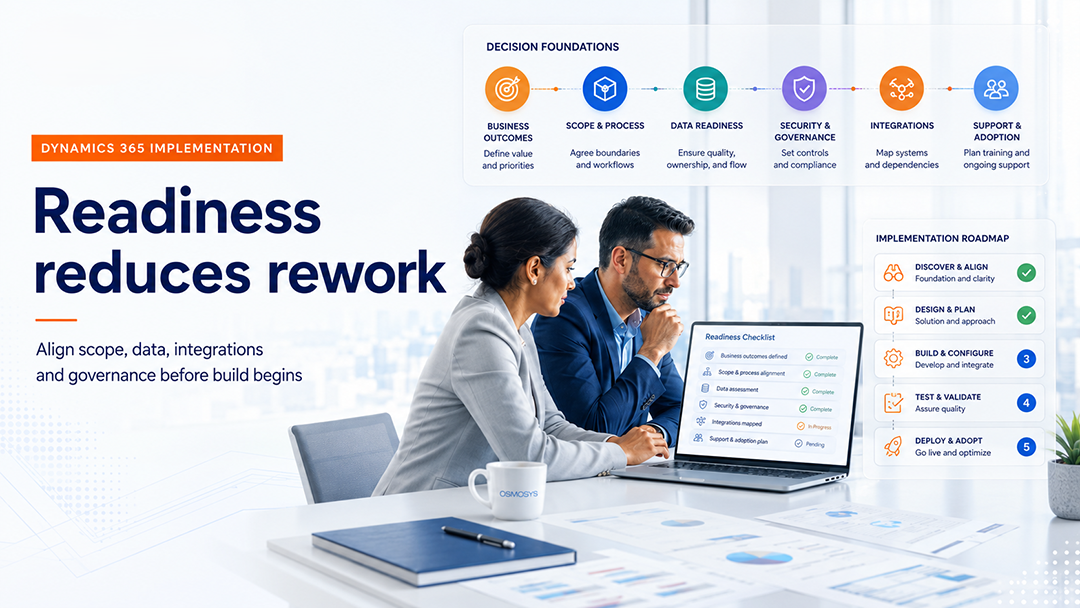
A successful Dynamics 365 rollout starts long before configuration begins. This Dynamics 365 implementation checklist helps CIOs, IT directors, programme sponsors and application owners align the business, technical and operational decisions that shape implementation success.
Teams often feel pressure to move quickly into workshops, solution design and configuration. However, unresolved scope, weak data ownership, unclear integrations and undefined governance can turn early momentum into expensive rework. A practical Dynamics 365 implementation checklist creates a shared view of what must be decided before delivery accelerates.
The aim is not to produce unnecessary documentation. It is to remove ambiguity, expose dependencies and give the implementation team a stable foundation.
Microsoft’s Dynamics 365 implementation strategy guidance also emphasises the importance of business vision, success measures, responsibilities, deployment, testing, adoption and operational planning throughout the implementation lifecycle.
Why Readiness Matters Before Configuration
Dynamics 365 can support significant improvements across sales, customer service, finance, operations and field service. However, the platform cannot compensate for unclear priorities or inconsistent decisions.
When readiness work is incomplete, common problems appear:
- Stakeholders define success differently.
- Phase-one scope continues to expand.
- Data migration begins before ownership is clear.
- Integration dependencies surface late.
- Security decisions are postponed.
- Testing becomes reactive.
- Users receive training too close to go-live.
- Support ownership remains unresolved.
Using a Dynamics 365 implementation checklist before configuration helps the organisation identify these risks while they are still easier and less expensive to address.
Dynamics 365 Implementation Checklist: 10 Decisions Before Configuration
The following Dynamics 365 implementation checklist covers ten decisions that should be agreed before detailed configuration begins. Each decision should result in a clear owner, documented output and agreed next step.
1. What Business Outcomes Must the Implementation Improve?
The first decision is not which fields, forms or workflows to configure. It is which business outcomes the programme must improve.
Broad ambitions such as “increase efficiency” or “modernise CRM” are not precise enough to guide implementation decisions. The programme needs measurable outcomes that help stakeholders prioritise requirements and assess value after go-live.
Examples may include:
- Reducing lead leakage.
- Shortening case-resolution time.
- Improving sales forecast accuracy.
- Standardising finance processes.
- Reducing manual approvals.
- Improving customer or operational visibility.
A useful question is:
What measurable improvement should the organisation expect within six to twelve months of go-live?
If teams cannot answer this consistently, the project may still be solution-led rather than outcome-led.
Readiness Output
Document the priority business outcomes, current pain points, baseline measures and post-go-live success indicators.
2. Which Processes Should Be Standardised?
Many organisations enter implementation assuming that every existing process must be recreated. That approach can preserve unnecessary complexity and make future changes harder.
Some processes are genuinely differentiating. Others are historical habits created by old systems, local workarounds or departmental preferences.
Before configuration, decide:
- Which processes can follow standard Dynamics 365 capabilities.
- Which processes require controlled regional or business-unit variation.
- Which processes genuinely justify customisation.
- Which processes should be redesigned rather than reproduced.
This decision is especially important in multi-entity, multi-country or multi-department programmes. Without it, every stakeholder may request a different version of the same process.
The Dynamics 365 implementation checklist should therefore include a structured process review, not just a list of requested features.
Readiness Output
Create a process decision log covering standardisation, approved variation, customisation and deferred redesign.
3. What Belongs in Phase One?
A strategic roadmap may cover several modules, teams, regions and integrations. Phase one should not attempt to deliver the entire roadmap at once.
A clear first-release scope protects the programme from uncontrolled expansion and helps the delivery team plan realistically.
Define:
- Modules and workloads included.
- Users, teams and departments included.
- Countries, legal entities or business units included.
- Mandatory integrations.
- Essential reports and dashboards.
- Requirements deliberately deferred.
The scope should also record exclusions, assumptions and dependencies. This gives sponsors a clearer basis for approving change requests.
Readiness Output
Produce a signed-off phase-one scope statement with inclusions, exclusions, assumptions, dependencies and later-phase items.
4. Who Owns Data Quality and Migration?
Data migration is not only a technical workstream. It is a business ownership and decision-making workstream supported by technical execution.
The programme should determine:
- Which source systems contain relevant data.
- Which records should be migrated.
- Which records should be archived or excluded.
- How duplicates will be identified and resolved.
- Which fields require cleansing or standardisation.
- Who validates migrated data.
- Which master-data rules apply after go-live.
Poor data can weaken user trust from the first day. It can also affect reporting, automation, AI features and customer interactions.
Use the Dynamics 365 implementation checklist to assign data owners early and define validation checkpoints before migration activity begins.
Readiness Output
Create a data-migration plan covering sources, ownership, cleansing, mapping, validation, cutover and reconciliation.
5. What Security and Compliance Model Is Required?
Security should be designed into the solution from the beginning. It should not be left until user acceptance testing or deployment.
Clarify:
- User roles and access boundaries.
- Business-unit and regional access requirements.
- Segregation-of-duties expectations.
- Approval authority.
- External or partner access.
- Audit requirements.
- Retention, privacy and regulatory obligations.
A rushed security model can create excessive access, blocked users or significant rework. A clear model also helps the technical team design environments, teams, roles and ownership structures correctly.
Readiness Output
Prepare a high-level security and access matrix that maps personas, responsibilities, data boundaries and approval needs.
6. Which Integrations Are Required for Go-Live?
Dynamics 365 usually operates within a wider application landscape. It may need to exchange data with finance systems, websites, data platforms, identity services, document repositories or industry applications.
Identify:
- Source and destination systems.
- Data exchanged.
- Direction and frequency of movement.
- Real-time or batch requirements.
- System ownership.
- Error-handling expectations.
- Security and authentication needs.
- Go-live priority.
Not every integration needs to be included in the first release. The business should distinguish between mandatory dependencies and improvements that can be phased later.
A complete Dynamics 365 implementation checklist should include an integration inventory because unresolved dependencies frequently become schedule blockers.
Readiness Output
Develop an integration inventory that records purpose, criticality, ownership, technical approach, dependencies and release priority.
7. How Will Reporting and KPIs Be Defined?
Reporting requirements are often postponed because stakeholders assume dashboards can be created later. However, useful reporting depends on earlier decisions about fields, process stages, data quality and ownership.
Before configuration, determine:
- Which decisions reports must support.
- Which KPIs matter to leadership and operations.
- Which data must be captured consistently.
- Which reports are essential at go-live.
- Whether Power BI, native dashboards or exports are required.
- Who owns KPI definitions.
A dashboard cannot solve inconsistent data capture. Reporting requirements should therefore influence process and data design from the beginning.
Readiness Output
Document priority reports, KPI definitions, source data, owners, frequency and intended audience.
8. What Is the Testing and Sign-Off Model?
Testing should validate business processes, integrations, permissions and operational readiness. It should not be treated as a final demonstration of configured features.
Define:
- Test phases and environments.
- Business participants.
- End-to-end scenarios.
- Test-data requirements.
- Defect severity and triage.
- Retesting expectations.
- Acceptance criteria.
- Sign-off authority.
System integration testing and user acceptance testing serve different purposes. Stakeholders should understand what each phase must prove.
The Dynamics 365 implementation checklist should name testing owners before build begins so that participants can reserve time and prepare realistic scenarios.
Readiness Output
Create a testing strategy covering scope, environments, responsibilities, defect management, acceptance criteria and sign-off.
9. Who Has Decision Authority?
Every implementation encounters trade-offs. A business unit requests an exception. A dependency threatens the timeline. A technical constraint affects design. A late requirement increases effort.
The programme must know who can decide.
Define:
- Executive sponsor.
- Programme owner.
- Business-process owners.
- Product owner.
- Design authority.
- Change-control body.
- Escalation path.
- Decision-turnaround expectations.
Governance should help delivery move faster, not add unnecessary meetings. Its purpose is to prevent unresolved disagreements and protect agreed priorities.
Readiness Output
Establish a governance model with named decision-makers, meeting cadence, escalation paths and change-control rules.
10. What Happens After Go-Live?
Go-live is the beginning of operational use, not the end of responsibility.
The organisation should decide:
- Duration and structure of hypercare.
- Support channels.
- Incident ownership.
- Service-level expectations.
- User training.
- Knowledge transfer.
- Adoption monitoring.
- Enhancement prioritisation.
- Release and change management.
Without a post-go-live model, issues may move between the project team, internal IT and implementation partner without clear ownership.
Use the Dynamics 365 implementation checklist to define the transition from project delivery to business-as-usual support before deployment.
Readiness Output
Create a post-go-live operating plan covering hypercare, support, training, adoption, governance and ongoing improvement.
How to Use This Checklist in a Readiness Workshop
This Dynamics 365 implementation checklist works best as the basis of a structured readiness workshop.
Bring together programme sponsors, business-process owners, IT leaders, data owners, security stakeholders, architects and the implementation partner.
Review each decision and record:
- Current level of clarity.
- Decision owner.
- Required evidence.
- Outstanding dependency.
- Agreed action.
- Completion date.
The purpose is not to force every detail into a single meeting. It is to separate confirmed decisions from assumptions and unresolved questions.
By the end of the readiness stage, the programme should have:
- Business outcomes and success measures.
- Phase-one scope.
- Process decision log.
- Data-migration plan.
- Security model.
- Integration inventory.
- Reporting priorities.
- Testing strategy.
- Governance model.
- Post-go-live operating plan.
These outputs provide practical inputs for solution design, estimation, configuration and delivery planning.
Common Signs That the Programme Is Not Ready
A programme may need further readiness work when:
- Stakeholders disagree on business priorities.
- Scope is still described only at a high level.
- Data owners have not been identified.
- Integration dependencies are not documented.
- Security decisions are deferred.
- Reporting expectations are unclear.
- Test participants are not confirmed.
- Sign-off authority is ambiguous.
- Training has not been planned.
- Post-go-live support has no owner.
These conditions are common, but they become more expensive once configuration is underway.
Reviewing the Dynamics 365 implementation checklist early gives the programme an opportunity to resolve these issues before they affect design, build and testing.
Final Thought
A strong Dynamics 365 implementation begins with decisions, not configuration.
A Dynamics 365 implementation checklist cannot eliminate every delivery risk. It can, however, expose unresolved scope, ownership and dependency issues before they become expensive design changes.
Organisations that invest in readiness are better positioned to make deliberate trade-offs, control scope and build a solution that users can operate and support after go-live.
How Osmosys Can Help
Osmosys helps organisations plan, implement and strengthen Microsoft business application initiatives through disciplined delivery.

Our teams support:
- Implementation readiness.
- Dynamics 365 solution planning.
- Power Platform delivery.
- System integration.
- Testing and release planning.
- Post-go-live stabilisation.
- Managed application support.
Frequently Asked Questions
What is Dynamics 365 implementation readiness?
Dynamics 365 implementation readiness is the planning stage that ensures the business, technical and operational foundations are clear before solution configuration begins. It typically covers scope, process decisions, data, integrations, governance, testing, security and post-go-live planning.
Why is implementation readiness important in Dynamics 365 projects?
Implementation readiness reduces rework, prevents scope confusion, improves stakeholder alignment and helps delivery teams configure the platform against clear business decisions rather than assumptions.
What should be decided before Dynamics 365 configuration starts?
Before configuration starts, organisations should define business outcomes, process priorities, phase-one scope, data migration rules, security requirements, integration needs, reporting expectations, testing ownership, governance and post-go-live support plans.
Who should be involved in a Dynamics 365 readiness stage?
A readiness stage should usually involve business owners, IT leaders, programme sponsors, solution architects, data owners, operational stakeholders and the implementation partner.
How long does a Dynamics 365 readiness stage usually take?
The timeline depends on project complexity, but many organisations benefit from a focused readiness stage lasting a few days to a few weeks, depending on the number of processes, integrations and stakeholders involved.