


A Dynamics 365 custom API should not be treated as a one-off technical workaround. In enterprise environments, it can become a reusable business capability that connects Dynamics 365, Dataverse, Power Platform, external systems and downstream processes.
That is why API strategy matters.
When teams build integrations only to solve the immediate request, the result is often fragile. Different flows call different endpoints. Business rules are repeated in multiple places. Security is handled inconsistently. Error handling depends on individual developers. Documentation becomes scattered. Every new integration adds more complexity.
A better approach is to treat APIs as product-like assets.
For enterprise architects, product owners and integration leaders, this means asking a different set of questions. Not only “can we connect these systems?” but also “should this integration become a governed capability that others can safely reuse?”
This article explains how to build a practical Dynamics 365 custom API strategy for scalable Power Platform integration.
Why Custom API Strategy Matters
Dynamics 365 rarely operates alone. It often needs to exchange information with finance systems, portals, data platforms, document repositories, customer applications, third-party tools and internal line-of-business systems.
Some integrations are simple. Others become business-critical.
A quote approval may need data from CRM, finance and product systems. A customer service workflow may need access to warranty, contract and entitlement data. A sales automation may need to validate pricing, credit limits or inventory. A Power App may need to surface information from systems outside Dataverse.
Without strategy, each requirement may create a new integration pattern. Over time, this creates duplication and support risk.
A Dynamics 365 custom API strategy helps teams define where business logic should live, how APIs should be reused, how access should be governed and how integration quality should be maintained.
Microsoft’s Dynamics 365 integration guidance notes that Power Platform and Dataverse are preferred options for integrating Dynamics 365 apps on Azure, and that Dataverse provides a REST-based API for developers.
Custom API Is Not Just a Developer Task
A custom API may sound technical, but the decision to create one is often architectural and product-led.
A developer can build an endpoint. But the organisation must decide:
- what business capability the API represents
- who owns the API
- which systems can consume it
- which business rules it should enforce
- what data it can expose
- how errors should be handled
- how changes will be governed
- how the API will be documented and supported
This is why Dynamics 365 custom API planning should involve enterprise architects, product owners, security teams and business-process owners, not only developers.
If the API represents a business capability, it needs a lifecycle. It should be versioned, tested, monitored and improved like any other product asset.
Where Dynamics 365 Custom APIs Fit
A Dynamics 365 custom API can be useful when the organisation needs a controlled way to expose business logic or integration actions.
Common scenarios include:
- creating a reusable action for Power Automate flows
- exposing controlled Dataverse operations to other systems
- standardising integration logic across multiple apps
- triggering business events
- simplifying complex operations behind a single interface
- reducing duplicated business rules across different automation layers
- supporting external system interactions with clear boundaries
Microsoft’s Dataverse documentation explains that custom APIs allow developers to create custom messages and can be used with Dataverse business events.
This matters because many organisations do not only need data movement. They need governed business operations.
For example, “create customer,” “validate contract,” “submit approval,” “check entitlement” or “trigger fulfilment” may be better handled as controlled business capabilities rather than scattered workflow steps.
The Role of Power Platform Integration
Power Platform makes it easier for makers and teams to build apps, automations and agentic experiences. But ease of creation can also increase integration sprawl if the underlying APIs are not governed.
A well-designed Power Platform integration approach should help makers use approved capabilities safely.
Custom connectors are often part of this model. Microsoft describes custom connectors as a way to define and use tailored APIs across Power Apps, Power Automate, Azure Logic Apps and Copilot Studio.
This creates an important opportunity. Instead of allowing every app or flow to connect to systems differently, the organisation can expose approved APIs through custom connectors. Makers get usability. IT gets governance. Business teams get repeatability.
That is where a Dynamics 365 custom API and Power Platform custom connector strategy can work together.
Treat APIs as Products, Not Projects
A project mindset asks, “What API do we need to deliver this requirement?”
A product mindset asks, “What reusable capability should this API provide over time?”
That difference changes the quality of the integration.
A product-led API has:
- a defined business purpose
- a clear owner
- approved consumers
- documented inputs and outputs
- security rules
- versioning discipline
- testing standards
- monitoring
- support ownership
- change management
For Dynamics 365 and Power Platform, this is especially important because APIs may serve multiple audiences: professional developers, Power Platform makers, integration teams, reporting teams and business-process owners.
A Dynamics 365 custom API should therefore be designed for controlled reuse, not only immediate delivery.
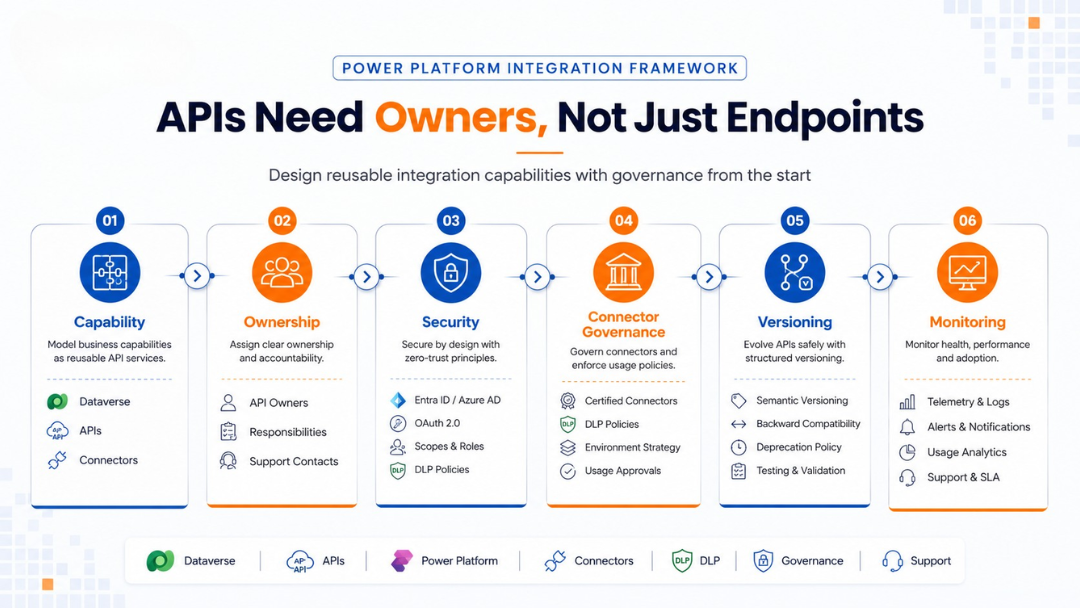
1. Define the Business Capability First
Before designing the API, define the business capability.
Do not start with endpoint names or connector actions. Start with the business operation.
For example:
- Create a qualified customer record
- Validate a customer account before order submission
- Retrieve approved pricing details
- Submit a service request
- Check contract entitlement
- Trigger onboarding workflow
- Sync approved master data
Each capability should have a clear business meaning. This keeps the API aligned to process intent rather than technical convenience.
A useful question is:
Would this capability be useful to more than one app, flow, system or future use case?
If the answer is yes, it may justify a governed API approach.
Output
Create a capability definition covering purpose, business owner, expected consumers, input data, output data and success criteria.
2. Decide Where the Logic Should Live
Integration quality depends heavily on where business logic is placed.
Logic may live in:
- Dynamics 365 configuration
- Dataverse custom APIs
- plug-ins
- Power Automate flows
- Azure Functions
- Azure Logic Apps
- Azure API Management
- external systems
- middleware or integration platforms
The wrong placement can create long-term support issues. If business rules are scattered across several flows, connectors and systems, change becomes difficult. If too much logic is hidden in custom code, business users may lose transparency. If logic is placed in the wrong system, data consistency can suffer.
A Dynamics 365 custom API strategy should define when logic belongs inside Dataverse and when it should be handled by another service layer.
For example, Dataverse may be appropriate for business operations tightly connected to Dynamics 365 data. Azure API Management or an external service layer may be appropriate when the API must serve broader enterprise consumers.
Output
Create an integration decision matrix showing which type of logic belongs in which platform.
3. Use Custom Connectors to Make APIs Usable
An API that only developers understand may not help the wider Power Platform ecosystem.
If the organisation wants makers to use approved integrations, custom connectors can make those capabilities easier to consume in Power Apps, Power Automate and Copilot Studio.
A custom connector can present an API as a set of actions with readable names, defined inputs, outputs and authentication settings.
For example, instead of asking makers to call a generic HTTP endpoint, a connector might provide actions such as:
- Validate Customer
- Create Service Request
- Get Contract Status
- Submit Approval
- Retrieve Product Availability
This improves usability and reduces the risk of makers creating inconsistent integration patterns.
Microsoft’s Azure API Management guidance also explains that APIs can be exported to Power Platform as custom connectors, helping professional developers publish backend services for maker consumption.
Output
Define which APIs should be exposed through custom connectors and which users or environments can access them.
4. Build Governance Around Data and Connectors
A strong Power Platform integration strategy must include connector governance.
Without controls, users may connect business data to services that are not approved for a particular use case. This becomes more serious when custom connectors expose enterprise APIs.
Governance should include:
- connector classification
- DLP policy alignment
- environment-level controls
- tenant-level controls
- access groups
- approval workflows
- connection ownership
- audit and review cadence
Microsoft’s Power Platform data policy guidance explains that data policies help prevent users from unintentionally exposing organisational data, and that admins can classify custom connectors by name or host URL.
This makes governance part of the API strategy. A custom connector is not only a convenience layer. It is also a policy surface.
Output
Create a connector governance register covering connector classification, environment access, DLP policy impact and owner review.
5. Design for Security from the Beginning
Security must be designed before an API becomes widely used.
For a Dynamics 365 custom API, security questions should include:
- Who can call the API?
- Which users or applications are allowed?
- Does the API respect user-level permissions?
- Is service principal access needed?
- What data can be exposed?
- What logs are required?
- How are secrets and credentials managed?
- What happens when access changes?
- Are there audit requirements?
Security decisions should be consistent across Dynamics 365, Dataverse, Azure and Power Platform. The more reusable the API becomes, the more important this consistency becomes.
Output
Create an API security model covering authentication, authorisation, permissions, logging, data sensitivity and access review.
6. Plan API Versioning and Change Management
Integrations fail when APIs change without warning.
If multiple apps, flows or systems depend on a custom API, changes must be governed carefully.
A versioning approach should define:
- when a change is backward-compatible
- when a new version is required
- how consumers are notified
- how long older versions are supported
- how breaking changes are approved
- how documentation is updated
- how testing is repeated
For enterprise-scale Power Platform integration, this is essential. A small change to a connector response can break multiple flows or apps.
A product-led API strategy treats change as a managed lifecycle issue, not an afterthought.
Output
Document API versioning rules and change-control processes.
7. Design for Error Handling and Support
An API should not only work when everything is correct. It should fail clearly when something goes wrong.
Define error handling for:
- missing data
- validation failures
- authentication errors
- permission issues
- unavailable downstream systems
- duplicate records
- timeout scenarios
- throttling or service limits
- malformed requests
- business-rule exceptions
Support teams need enough information to identify the cause without manually tracing every layer of the integration.
A Dynamics 365 custom API should therefore return meaningful responses and produce useful logs.
Output
Create an error-handling standard with response types, logging rules, support ownership and escalation paths.
8. Monitor Usage and Performance
Once an API becomes reusable, leaders need visibility.
Monitoring should cover:
- number of calls
- consuming apps or flows
- error rates
- response times
- failed operations
- high-volume consumers
- unusual usage patterns
- security exceptions
- business-process impact
Monitoring helps the organisation understand whether the API is delivering value and whether it needs optimisation.
This is especially important when APIs support customer-facing processes, revenue operations, service workflows or compliance-related activity.
Output
Create an API monitoring dashboard or reporting cadence covering usage, failures, performance and business impact.
9. Align APIs with ALM and Environment Strategy
APIs, connectors and flows should move through environments in a controlled way.
A mature implementation should consider:
- development environment
- test environment
- user acceptance testing
- production environment
- solution packaging
- deployment pipelines
- connection references
- environment variables
- release notes
- rollback planning
This prevents unmanaged movement of integrations between environments.
A Dynamics 365 custom API should be part of the same application lifecycle management discipline as the broader solution. Custom connectors, flows and related components should not be treated as disconnected artefacts.
Output
Define how API components, connectors and automation assets move from development to production.
10. Decide When Not to Build a Custom API
Not every integration needs a custom API.
A custom API may be unnecessary when:
- a standard connector already solves the need
- the use case is temporary
- the process is not business-critical
- the integration is only for one low-risk scenario
- reporting or export is enough
- the data can be handled through standard Dataverse capabilities
- the organisation cannot support the API long term
Building a Dynamics 365 custom API creates responsibility. Someone must maintain it, secure it, monitor it and update it.
Good strategy includes restraint. The goal is not to custom-build everything. The goal is to create governed capabilities where reuse, control and business value justify the effort.
Output
Create API decision criteria that help teams choose between standard connectors, custom connectors, Dataverse APIs, middleware, automation or custom development.
A Practical Custom API Strategy Checklist
Use this checklist before approving a custom API for Dynamics 365 or Power Platform:
- Is the business capability clearly defined?
- Is there a named business owner?
- Is there a named technical owner?
- Will the API be reused by multiple consumers?
- Is a standard connector already available?
- Is the data sensitivity understood?
- Are access permissions defined?
- Is DLP impact reviewed?
- Is connector classification required?
- Is the API documented?
- Are inputs and outputs stable?
- Is versioning planned?
- Is error handling standardised?
- Is monitoring available?
- Is support ownership clear?
- Is there a retirement or replacement path?
This checklist keeps API decisions connected to product thinking rather than short-term delivery pressure.
Common Mistakes in Dynamics 365 and Power Platform Integration
Several integration mistakes are common:
- Creating one-off flows for every requirement
- Repeating the same business rule across multiple apps
- Allowing makers to use unmanaged HTTP calls without governance
- Exposing broad data access through connectors
- Building APIs without a named owner
- Ignoring DLP and connector policies
- Skipping versioning and documentation
- Treating error handling as a developer detail
- Moving connectors manually between environments
- Failing to monitor usage after go-live
These mistakes usually appear small at first. They become serious when the solution grows, more teams depend on the API and integrations become part of daily operations.
A product-led Dynamics 365 custom API strategy reduces this risk.
Final Thought
Integration is not only about connecting systems. It is about creating reliable, reusable and governed business capabilities.
A Dynamics 365 custom API can help organisations simplify complex operations, improve reuse and support stronger Power Platform integration. But it should be created with ownership, security, lifecycle management and support in mind.
When integration needs product thinking, the question is not just “Can we build an API?”
The better question is:
Can this API become a trusted capability that the business can safely reuse, operate and improve over time?
How Osmosys Can Help
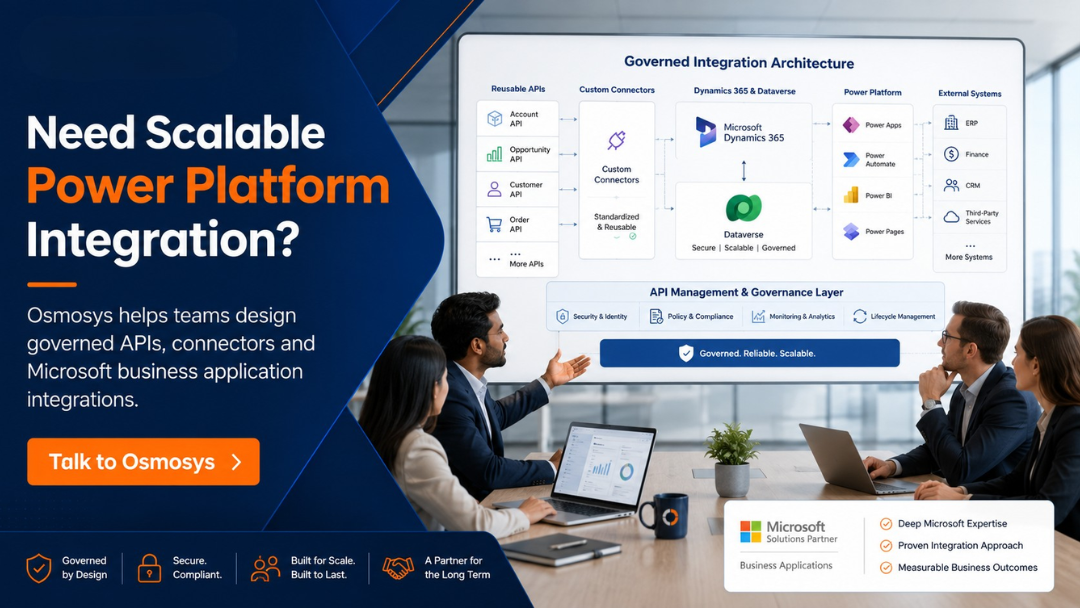
Osmosys helps organisations plan, build and support Microsoft business application ecosystems with practical delivery discipline.
Our teams can support:
- Dynamics 365 custom API strategy
- Power Platform integration planning
- Dataverse custom API design
- custom connector development
- integration architecture
- API governance
- security and DLP alignment
- solution lifecycle management
- managed application support
- ongoing optimisation
FAQs
What is a Dynamics 365 custom API?
A Dynamics 365 custom API is a custom operation created in Dataverse to expose specific business logic or integration behaviour. It can help teams create reusable actions that support Dynamics 365, Power Platform and external system scenarios.
When should an organisation create a Dynamics 365 custom API?
An organisation should consider a Dynamics 365 custom API when a business operation needs to be reused, governed, secured and exposed consistently across apps, flows, integrations or external systems.
How does a custom API support Power Platform integration?
A custom API can support Power Platform integration by exposing approved business logic that can be consumed through Power Apps, Power Automate, custom connectors or other integration layers.
What is the difference between a custom API and a custom connector?
A custom API usually defines a business operation or message in Dataverse. A custom connector makes an API easier to consume in Power Apps, Power Automate, Azure Logic Apps or Copilot Studio.
What should be included in a custom API strategy?
A custom API strategy should include business capability definition, ownership, security, data access, connector governance, versioning, error handling, monitoring, documentation, ALM and support ownership.