

For many UK organisations, the data conversation has changed.
It is no longer just about replacing legacy systems or connecting dashboards. It is now tied to AI readiness, reporting quality, governance, and how quickly teams can move from operational data to usable decisions. That shift is showing up in current UK signals. Government research published in February 2026 found that AI adoption is still modest across UK businesses, while separate government analysis published in January 2026 continues to link data investment and data-related activity with productivity. At the same time, KPMG’s April 2026 UK AI pulse release shows that many UK business leaders are still investing in AI even when traditional ROI is hard to quantify.
That is exactly why the dataverse vs sql server question matters more than it did a year ago.
If the wrong data lands in the wrong platform, teams usually feel it in one of three places: slow reporting, brittle integrations, or application changes that become harder than they should be. And in 2026, with Microsoft continuing to tighten the relationship between Dataverse and Fabric, the decision is no longer a simple one-platform choice. Dataverse can now link directly to Microsoft Fabric and make Dynamics 365 and Power Apps data available in OneLake without building ETL pipelines, while OneLake itself is positioned as the unified logical data lake for the organisation.
So where should the data actually live?
The short answer is this:
Dataverse is for business application data.
SQL Server or Azure SQL is for application-grade relational transactions and developer-controlled operational systems.
OneLake is for analytics, cross-domain data, and broader data estate unification.
The longer answer is where the real architecture decision sits.
Start with the real question, not the product names
When teams compare Dataverse, SQL Server, and OneLake, they often treat the decision as a product shootout. That usually leads to the wrong outcome.
A better question is:
What kind of data is this, and what does the business need to do with it?
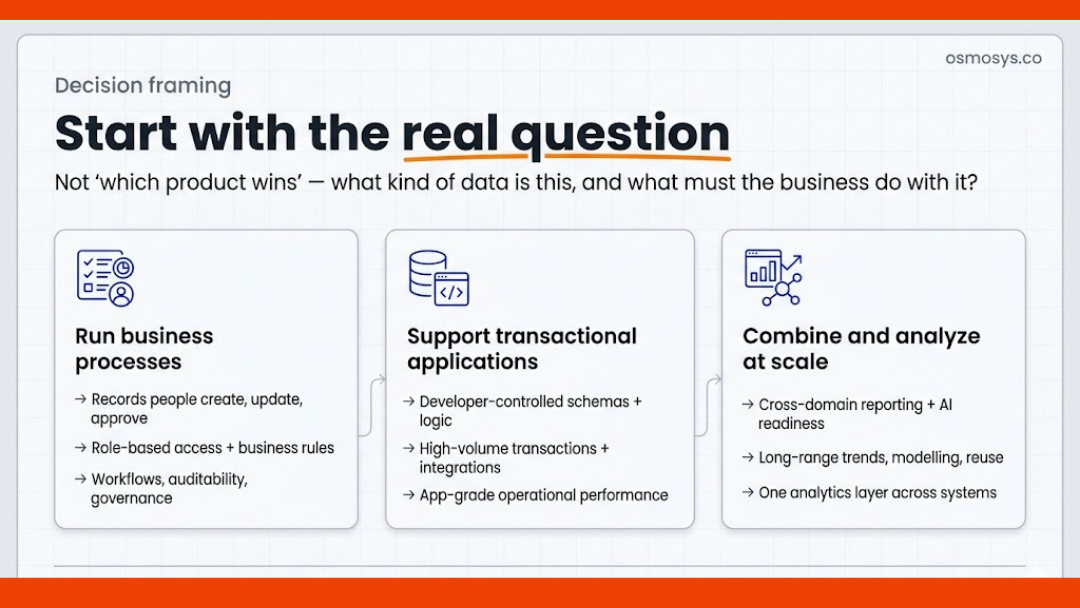
There are three separate needs hiding inside most modern Microsoft estates:
- A place to run operational business processes
- A place to support transactional application logic
- A place to combine, analyse, and model data at scale
Those needs are related, but they are not the same.
When Dataverse is the right fit
Microsoft describes Dataverse as a platform to securely store and manage data used by business applications, with data organised in tables and designed for Power Apps and Dynamics 365 scenarios. That positioning matters. Dataverse is not just a relational store. It is part of an application platform with business rules, security models, relationships, automation hooks, and low-code extensibility already built into the wider Power Platform stack.
That makes Dataverse the right choice when your data is closely tied to:
- Dynamics 365 processes
- Power Apps applications
- role-based business access
- workflows and approvals
- records that users create, update, and act on in a governed application layer
Think about sales records, case management, service activity, project-related entities, inspection outcomes, approvals, requests, master records used inside Power Apps, or operational business entities that need auditability and app-aware security.
In practical terms, Dataverse is usually the right answer when the business is asking questions like:
- Who owns this record?
- What app or workflow acts on it?
- What role should be allowed to change it?
- What business rule should apply before save or submit?
- How should this show up in Dynamics 365 or Power Apps?
If those are the dominant questions, Dataverse usually deserves serious priority.
Where Dataverse often gets misused
Dataverse gets stretched when teams try to make it the answer for every data problem.
It is not the best destination for every raw operational feed, every historical archive, or every cross-domain analytics workload. Microsoft’s current Fabric guidance is helpful here because Dataverse data can now be linked into Fabric and surfaced in OneLake through shortcuts, giving analysts access without forcing the operational app platform to become the analytics platform. Dataverse also generates a Fabric lakehouse and SQL endpoint as part of that link.
That is a strong signal for architects: keep Dataverse focused on business application value, and let Fabric handle broader analytics.
When SQL Server is the right fit
SQL Server remains the more natural fit when you need a traditional relational database management system with strong developer control, T-SQL-based logic, transaction handling, and broader application design flexibility. Microsoft’s own SQL Server documentation still defines it as an RDBMS, while Azure SQL continues to be positioned as a managed cloud family built on the same SQL database engine.
That makes SQL Server or Azure SQL the stronger option when you are building or supporting:
- custom operational applications
- high-volume transactional systems
- tightly controlled schemas and stored procedure logic
- integration-heavy back-end services
- systems where application developers need deeper database-level control
This is where the dataverse vs sql server decision usually becomes clear.
If the data exists primarily to serve a custom application, complex integration logic, or transaction-heavy workload, SQL Server is often the better fit.
If the data exists primarily to serve a business process inside Dynamics 365 or Power Platform, Dataverse is often the better fit.
That distinction matters because it affects everything else: change management, governance, licensing expectations, reporting paths, and how quickly teams can build on top of the data later.
A simple rule of thumb
Use SQL Server when the database is serving the application.
Use Dataverse when the data is serving the business process.
That is not absolute, but it is a strong starting point.
When OneLake is the right fit
OneLake is not just another database option in the same category.
Microsoft describes OneLake as the single, unified, logical data lake for the whole organisation, built into every Fabric tenant. It is designed to support one copy of data across multiple analytical engines and reduce the overhead that comes from multiple disconnected lakes. OneLake shortcuts also allow teams to connect existing data sources without directly copying the data.
That means OneLake is the right fit when the need is:
- enterprise analytics
- cross-functional reporting
- data science and AI workloads
- domain-level data unification
- long-range trend analysis
- lakehouse or warehouse patterns
- bringing multiple systems into one analytical layer
In other words, OneLake is not where most front-line business records should start their life. It is where broader analytical value should usually be assembled.
That distinction has become even more relevant in 2026 because Microsoft Fabric continues to expand the ways operational estates can feed OneLake. Dataverse now links directly to Fabric, and Fabric Mirroring can continuously replicate data from existing estates into OneLake with low latency for analytics consumption. Microsoft also describes Mirroring as a way to bring data into a single analytics platform without building complex ETL pipelines.
So if your organisation wants one reporting and analytics layer across Dynamics 365, custom apps, operational databases, and external data sources, OneLake should be part of the design conversation.
Dataverse vs SQL Server vs OneLake: the practical decision model
Here is the clearest way to think about it.
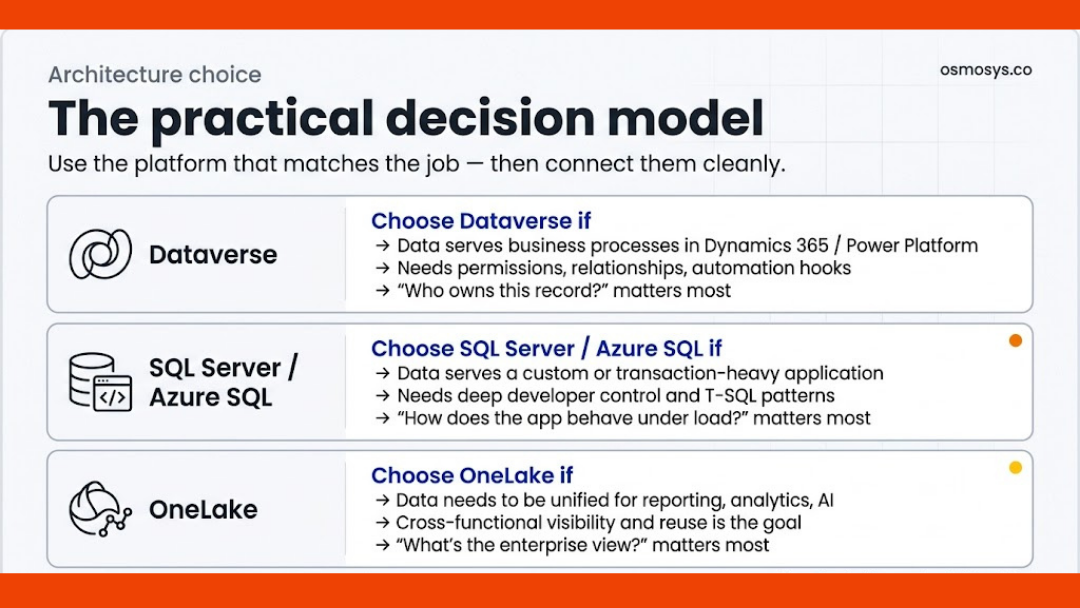
Choose Dataverse if:
Your main goal is to run business processes in Dynamics 365 or Power Platform, with structured records, relationships, permissions, automation, and app-aware governance.
Choose SQL Server if:
Your main goal is to support a custom or transaction-heavy application where developers need deeper control over schema, queries, integrations, and database behaviour.
Choose OneLake if:
Your main goal is to unify data for reporting, analytics, AI, and enterprise-wide visibility across multiple systems.
The mistake is assuming one of these must replace the others.
In many Microsoft estates, the strongest design is not either-or. It is layered.
The architecture pattern that now makes the most sense
For many mid-sized and enterprise organisations, especially those already using Dynamics 365, Power Platform, or Microsoft Fabric, the healthiest architecture pattern now looks like this:
Dataverse for operational business entities and workflow-driven records
SQL Server / Azure SQL for custom transactional applications and service back ends
OneLake / Fabric for analytics, unification, modelling, and AI readiness
That pattern lines up with how Microsoft is increasingly connecting the platforms. Dataverse can link its data into OneLake, OneLake can unify access through shortcuts, and Fabric Mirroring can replicate existing data estates into the analytics layer. Microsoft has also expanded SQL options inside Fabric itself, with SQL database in Microsoft Fabric positioned as a transactional database based on Azure SQL Database.
The important point is this:
Operational systems and analytical systems should work together, but they should not be forced to be the same thing.
What UK decision-makers should watch for in 2026
This is where the UK angle matters.
Many organisations are under pressure to show clearer value from AI, reporting, and digital operations. But current UK signals still suggest uneven maturity. Government research says only a minority of UK businesses are currently using AI, while KPMG’s April 2026 findings show leaders are still pushing investment forward and DSIT’s productivity-focused data study reinforces the importance of stronger data practice.
That creates a familiar risk.
Teams rush into analytics or Copilot-style ambitions before fixing the underlying question of where core data should live and how it should flow.
The result is usually one of these:
- duplicate records across app and reporting layers
- avoidable integration work
- unclear ownership between operations and analytics teams
- governance gaps around who can change what
- delayed reporting because the “source of truth” is not actually clear
For UK businesses trying to modernise without creating fresh architecture debt, the better move is to be explicit:
- What data is operational?
- What data is transactional?
- What data is analytical?
- What should be mastered where?
- What should be replicated, linked, or exposed rather than copied?
Those are the questions that prevent platform decisions from becoming expensive clean-up programmes later.
A clear answer to the question
So, Dataverse vs SQL Server vs OneLake: where should data live?
Here is the practical answer.
Use Dataverse when the data belongs inside a business application and needs process-aware governance.
Use SQL Server when the data belongs inside a custom or transaction-driven application and needs deeper developer control.
Use OneLake when the data needs to be analysed, combined, modelled, or reused across the business.
And if your organisation is already in the Microsoft ecosystem, do not force a false choice where a layered architecture will do a better job.
In 2026, the smartest data estates are not trying to make one platform do everything. They are making each platform do the job it is best suited to do.
Final thought
The real design decision is not whether Dataverse, SQL Server, or OneLake is “best”.
It is whether your architecture is honest about the role your data needs to play.
Because once that is clear, the platform choice usually becomes much easier.
FAQs
Is Dataverse better than SQL Server?
Not generally. Dataverse is better for Power Platform and Dynamics 365 business-process data. SQL Server is better for custom transactional applications and deeper developer-controlled database workloads.
Should I move SQL Server data into OneLake?
Only if the goal is analytics, reporting, AI, or cross-domain visibility. OneLake is typically the better destination for analytical use, not as a like-for-like replacement for every operational database. Microsoft Fabric Mirroring and OneLake shortcuts are designed to help bring existing data into the analytics layer more easily.
Can Dataverse and OneLake work together?
Yes. Microsoft’s current guidance shows Dataverse can link directly to Fabric, make data available in OneLake, and surface that data through Fabric lakehouse and SQL endpoint experiences.
Is OneLake the same as Dataverse?
No. Dataverse is an operational business application data platform. OneLake is Microsoft Fabric’s unified logical data lake for analytics and broader data unification.

Osmosys Software Solutions